


DMC program operations softwareRun the whole program from one place, even on the day it goes wrong.
Itinerary, guests, staff, suppliers and money, all together. Day sheets fill themselves in. Margin alerts warn you when costs creep up. And IROPS is ready for the day the weather wins.
18
features for running programs
1
day sheet for each day, filled in from the program
1
place for the itinerary, staff and money
3,000+
guests in one program. Groups of 30 work the same way.
On site
Your team has today's day sheet on their phone, always current.
Day sheets fill themselves in from the program, so the crew on site starts from the same plan the office sees.

01Run of show
The day sheet is built from the program, ready the night before.
Each day on site gets its own sheet, filled in from events, flights, transfers and staff. Nobody builds it by hand at midnight. When something changes, the sheet follows.
- Each row shows where it came from: events, flights, transfers, staff or supplier bookings
- Your own rows and edits always win, and you can switch back to automatic at any time
- Lock a day so nobody changes it. Print it, or read it on your phone at the curb
Flight disruption · storm over Lisbon · 14:12
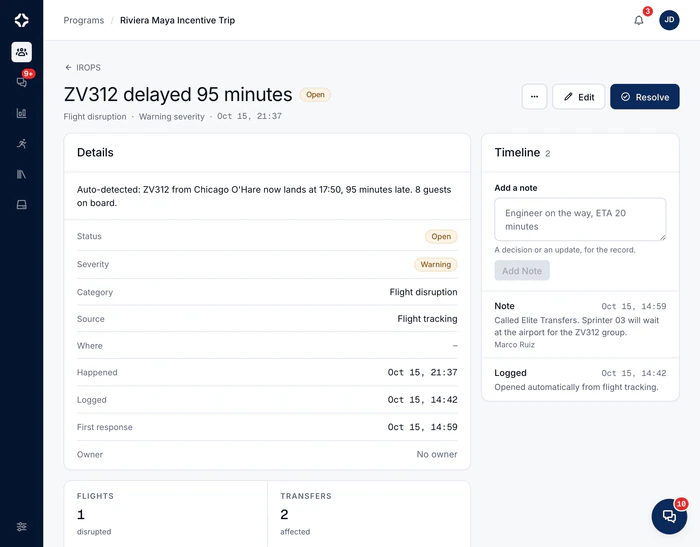
See everything a disruption affects on one screen.
A flight app can tell you a flight is late. DMC Pilot holds the whole program, so it shows which coaches, suppliers, guests and rows of tomorrow's day sheet are affected. You act on all of them from one screen. Here, a storm over Lisbon during a 600-guest congress.
3
flights
delayed
2
transfers
affected
180
guests
affected
2
suppliers
to re-confirm
Team messages, client updates and re-confirmations are saved on the incident timeline.
02IROPS
When a program is disrupted, one screen shows what it affects.
A storm, a mass delay, a canceled charter. IROPS is where you handle flight disruptions and on-the-ground issues: it keeps every issue and change on the program. For a flight disruption, it shows exactly which flights, transfers, suppliers and guests are affected.
- The disrupted flights, the affected transfers and guests, and the suppliers to re-confirm
- Log an issue or a change note with a category, severity, owner, photos and cost. Several can be open at once
- One message to the team reaches program chat, the notification bell and their phones. You write the travel update for the client
- Ask suppliers to re-confirm and re-plan transfers from the same screen
- A duty-of-care timeline, and every entry in the after-event report
03Margin alerts
Margin alerts tell you when rising costs eat into your margin.
When the client accepts, the costing is saved as your starting point. Live costs are compared with it. An alert names the suppliers behind the extra cost while you can still act, not after the program closes.
- Client price, cost to deliver and margin, live, supplier by supplier
- Payment dates that flag what is overdue; PDF and CSV exports
- Your own tax rates (VAT, sales tax, GST), reverse charge per proposal, and several currencies
- Alerts before the margin is gone, and a History tab with every cost change, before and after

Staff clock in with a link, or with the app (free for freelancers).
On-site staff check in from whatever phone they have. The board shows who is where, and the timesheet is ready for payroll.
04Staff time tracking
See who is working on site, and since when.
Staff check in and out from a personal link, with their location, and nothing to install. Freelancers you invite can use the app for free. The board shows who is where, and the timesheet is ready for payroll.
- A personal check-in link for each person: copy it, email it or switch it off. The history is kept
- Check-ins from the app and by hand are marked apart, and every correction has a reason
- Overnight shifts handled, and a CSV export for payroll
- Freelancers, guides and drivers alongside your employees
05New programs
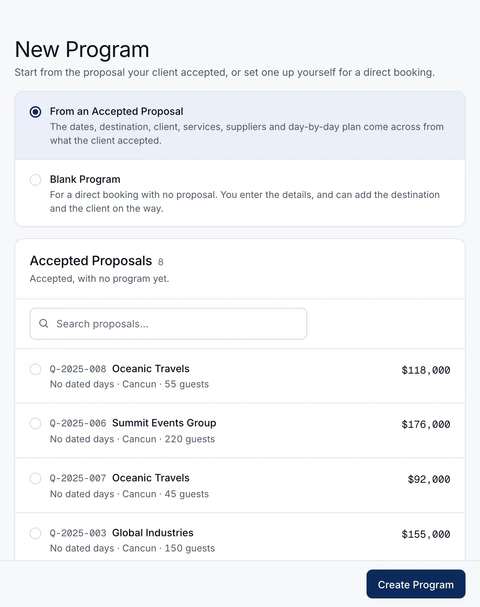
A program starts from what the client accepted.
New Program opens on the proposals your clients accepted that have no program yet. Pick one, and the program is built from it. For a direct booking with no proposal, start blank and add the destination and the client as you go.
- Travel dates from the proposal's days, the destination and its time zone
- The guest count, the client and the contact the proposal was sent to
- The sold lines at their agreed prices, and a pending booking with each line's supplier
- One itinerary event per day, and the deal marked won
- Switch off the parts a program does not need. Nothing in them is deleted
06Past programs
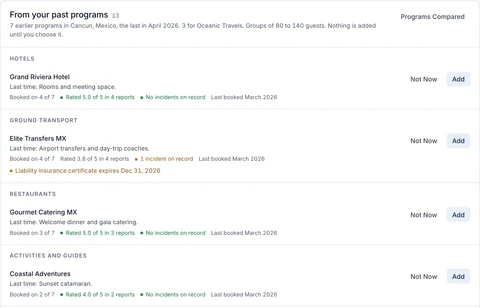
Start a new program from one you have already run.
Copy an earlier program to new dates and a new group size. The schedule moves to the new dates and per-guest quantities follow the new group, so last year's 42-guest incentive can become this year's 90-guest one. You review everything before anything is created. Copying a program is on every plan.
- Services at today's catalog prices, with the old price shown when it changed
- Suppliers come across waiting for a new quote
- Guests, flights, money and messages are never copied
- Suggestions from your similar finished programs on Growth and up, same destination first, then the same client, group size and season
- Suppliers with how often you used them, their After-Event Report rating and incidents on record. Also services at today's price, the transfer vehicles you used, staffing per 100 guests and approved lessons from past issues
- You add each suggestion one at a time. Suggestions appear once you have 2 similar finished programs
07Guest needs
Every guest's access and medical needs, where your team works.
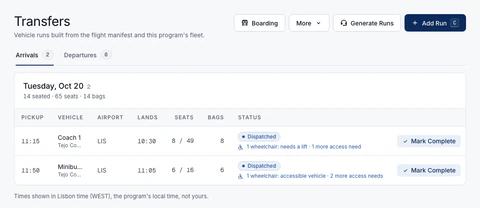
Record a guest's access needs once: a wheelchair, step-free access, low vision, hearing or a service animal. Flag a medical need or a severe allergy. The needs then show on transfers, the boarding board, check-in and the day sheet, with what to do. On every plan.
- Per guest and per transfer run, for example “1 wheelchair: vehicle needs a lift or ramp”
- In Dietary by Event and the kitchen export
- Suppliers see counts and what you ask of them, never names. The client page shows counts only
- Private notes only for people with guest privacy access
- Manifest import reads columns like Wheelchair or Medical, and airline codes such as WCHR, WCHC, BLND, DEAF, SVAN and MEDA
Everything in program operations
Operations questions
What does the program overview show?
What needs you, not a long list. Needs attention comes first, most urgent at the top. Ready to run shows how much is done. Today and next shows what is coming. On the ground shows who has arrived and boarded. The money panel shows the client price, the cost to deliver and the margin. Finished programs are archived 30 days after the end date, unless you change that, and a copy of the program goes into an Archive folder in Storage.
How does the run of show stay up to date?
It fills itself in from what is already in the program: events, flights, transfers, staff shifts and supplier bookings. When a flight is delayed, a pickup that is still a proposal gets the new time. An approved pickup is flagged for you to review. Your own rows and edits always win. You can lock a day, so nobody can add, edit or hide its rows until someone unlocks it.
Do on-site staff need to install anything?
No. Each person gets a personal check-in link. Checking in and out records the time and the location. Check-ins from the app and those entered by hand are marked apart. Timesheets export to CSV, with corrections and overnight shifts handled. Freelancers, guides and drivers sit alongside your employees. A freelancer you invite to the app uses it free, sees only their own programs, and checks in from a shift card on the phone.
What is IROPS for?
It keeps every issue and change on a program, and it is your screen for the day a program is disrupted. Log an issue or a change note with a category, a severity, an owner, photos and estimated costs. Several can be open at once. Flight tracking opens a flight disruption by itself when a flight is canceled, diverted or 45 minutes or more late. It shows the disrupted flights, the affected transfers and guests, and the suppliers to re-confirm. From there you send one message to the whole team, write a travel update for Client View, and keep a duty-of-care timeline. Every entry also goes into the after-event report. It is on Growth and up.
Where do dietary needs and activity sign-ups live?
With the guests. Dietary by Event shows each guest's dietary and allergy needs for each event, with the note as it was written. It appears once a lawful basis for health data is recorded on the program. An event can also take sign-ups: confirmed and waitlisted guests are split across boats, vehicles or tables, within capacity. The supplier sees the list in the supplier portal. Both are on every plan.

See a program from the first day to the last flight home.
The demo follows one program from start to finish: the overview, the day sheet, a practice disruption, and the margin panel that shows where the money went.