

What your team sees
| Line | Price | Cost | Margin |
|---|---|---|---|
| Welcome dinner · Praça do Comércio | €7,200 | €5,460 | 24.2% |
| Airport transfers · 6 runs | €3,600 | €2,890 | 19.7% |
| Sintra jeep day · 4 groups | €6,200 | €4,550 | 26.6% |

Your deals, follow-ups, proposals and price list sit right next to operations. When the client signs, nobody hands over a folder of PDFs. The proposal becomes the program, with its dates, client and services.
5
deal outcomes, whatever you call your stages
15
features for sales and proposals
1
program created for you when the client signs
6
proposal designs, each in your brand
At the sales desk
Deals, follow-ups, proposals and your price list sit in one place. When the client signs, the proposal becomes the program.

With separate tools, each step below means someone copying details by hand. Here each step carries what came before. The program you run in July is the proposal the client signed in March.
01Pipeline
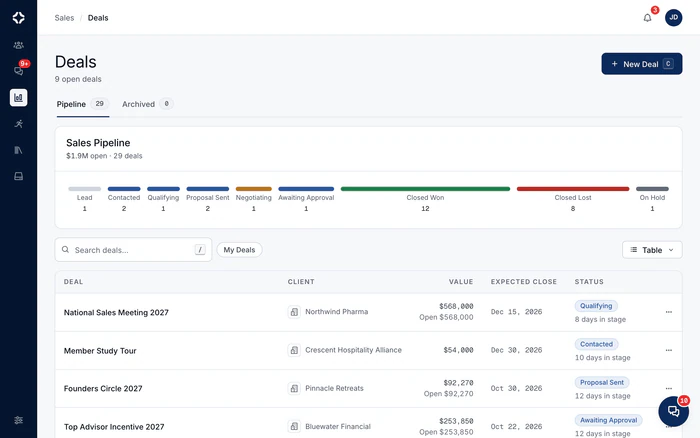
Name your stages the way your team talks: Tentative, Definite or Postponed. Each one counts as open, won, lost, paused or canceled. Work from a board or a table, with a searchable archive. Every lost deal asks for a reason, so you learn from it.
02Proposals
Build each proposal from blocks: a cover, events, galleries and video. Prices come from your own Products & Services list. Pick one of six designs. Your client gets a link in your company's name, with an optional password, and signs at the end.
Your team sees the cost and the margin. Your client's link is built from the same lines, without those columns. They are never sent to the client, so there is no setting to forget. Here are three lines from a 40-guest incentive in Lisbon.
What your team sees
| Line | Price | Cost | Margin |
|---|---|---|---|
| Welcome dinner · Praça do Comércio | €7,200 | €5,460 | 24.2% |
| Airport transfers · 6 runs | €3,600 | €2,890 | 19.7% |
| Sintra jeep day · 4 groups | €6,200 | €4,550 | 26.6% |
What the client sees
| Line | Amount |
|---|---|
| Welcome dinner · Praça do Comércio | €7,200 |
| Airport transfers · 6 runs | €3,600 |
| Sintra jeep day · 4 groups | €6,200 |
03RFP response
Briefs often arrive as a short email with a 20-page attachment. RFP response reads PDF, Word, Excel and even scans, plus CSV and email files forwarded to a program inbox. It matches each request to your own services and builds a priced draft for you to review.
04Money across programs
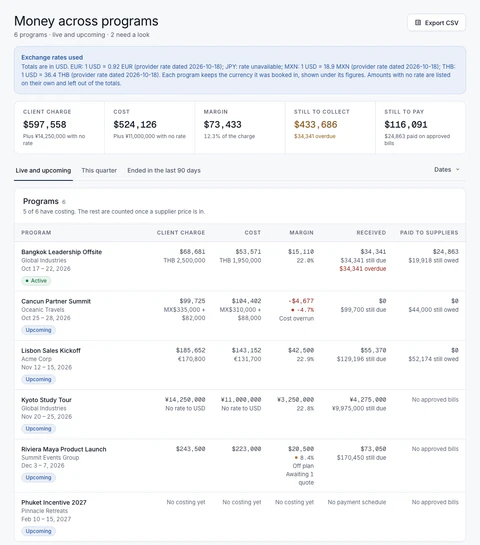
One page in Sales lists every live and upcoming program with what the client pays, what it costs and the margin. You also see what you have received, what is still due and what you still owe suppliers. Sort by lowest margin to find the program that needs a look first.

Everything that follows still carries what was agreed: the coaches, the rooming list, the supplier confirmations and the margin you actually kept.
Both, kept apart. Your team sees the client price, your cost and your margin side by side. The client's link shows only what the client pays. Optional lines, hidden lines, tax and a management fee are ordinary lines. Each version you send is saved as it was sent, so you can revise and resend without losing the history.
Yes. RFP response reads the brief, including PDF, Word, Excel and scanned attachments. It matches each request to your Products & Services, by name and by meaning, and builds a priced draft. Prices always come from your own price list: the AI chooses and describes, and never makes up a number. You review the draft before anything is sent.
The program is created the moment the client accepts. It gets the dates, the destination and its time zone, the guest count, the client and contact, and the sold lines at their agreed prices. Each line's supplier gets a pending booking, and each dated day becomes an itinerary event. A saved copy of the proposal's costing becomes the baseline that Margin alerts compare live costs against. The deal, the proposal and the program stay linked, so nothing is retyped.
Yes. Every signature records the signer, the date and time, the consent wording, the IP address, the device and a unique fingerprint of the signed document. Contracts come from your Contract Library, as templates kept by version. Each client signer signs from a private link, in the order you set. Your own signature is recorded by your team with the signed PDF, and you can upload a countersigned copy to the same record.
Yes. Raise an invoice from what the client accepted, take part payments, and credit a whole invoice, some lines or an amount. Each supplier bill is checked against the agreed booking. A bill that differs from the agreed cost needs a written reason before it can be approved. Commissions for agencies and partners sit on the proposal, and the client never sees them. You can set one rate on services and another on fees. Each document keeps its own currency, shown at daily exchange rates or at a fixed rate you approve for a currency pair and period.

On the demo we run a sample client brief through RFP response with a sample price list, and take the result all the way to signature.