


Program margin tracking software for DMCsKeep the margin you sold.
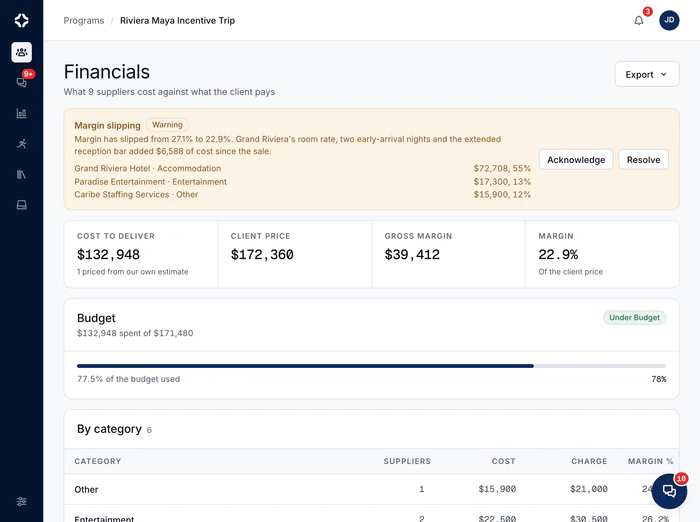
Margin is rarely lost in one bad decision. It slips away in small changes nobody adds up, and you only find out after the program ends. Margin alerts save the costing you sold, compare live costs with it, and show you where the money went. While you can still act.
How do you track margin on a live program?
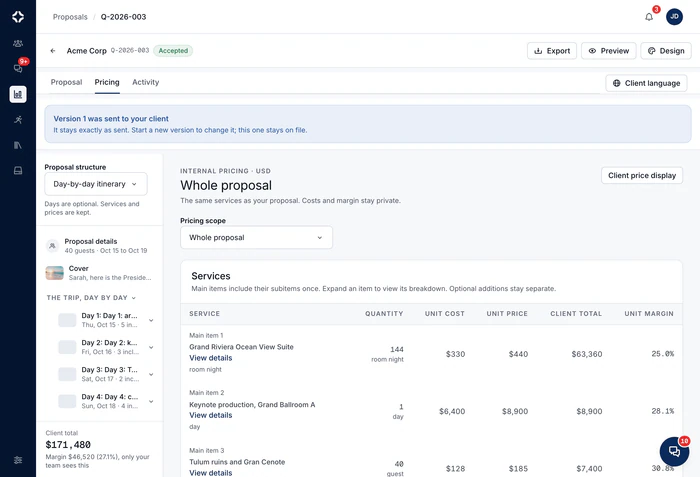
Save what you sold
When the client accepts, a copy of the proposal's costing is saved as the program's sold baseline: the margin you sold, on record.
Watch live costs
Accepted supplier changes, credit notes and new lines update the live cost as they happen. Every six hours, it is compared with the baseline.
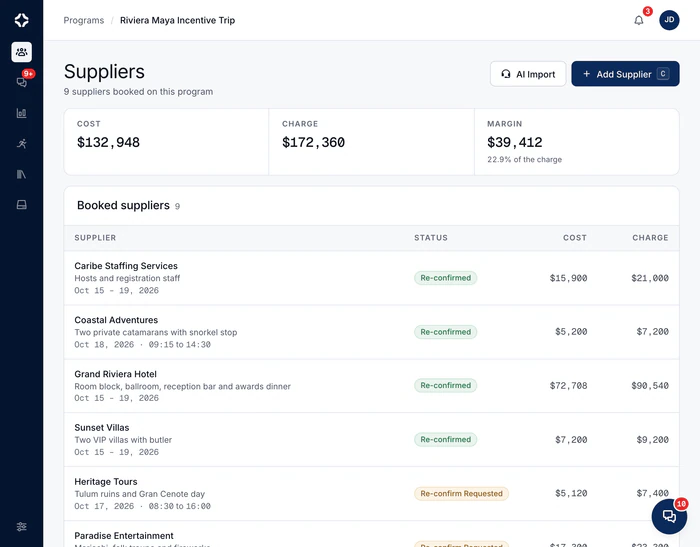
Name the suppliers
Every cost is linked to a supplier. So an alert names up to three suppliers carrying the most cost, with each one's share of spend.

Know the margin before the program closes.
Not in the post-mortem a month later.
Alert in time
The alert shows on Home and on the program summary while the program is still running. The History tab shows what changed, before and after.
Why keep margin in the same place as your suppliers?
With separate tools, a supplier's change sits in an email and the costing sits in a spreadsheet. Someone has to remember to update the client price and the program's profit. Here, accepting the change is the cost update, and the figures in Program finances follow it. Margin tracking is not a report you build. It works because nothing has to be retyped.
- Client price, cost to deliver, margin and margin %, always up to date
- Program finances export to PDF and CSV for anyone who wants files
- Payment milestones, with overdue ones flagged, in the same picture
- Margin after commission: what each agency or partner is owed, with different rates on services and on fees
- Supplier bills checked against the agreed cost; a difference needs a written reason before approval
- Money across programs: every live and upcoming program's charge, cost, margin and what is still due, on one page in Sales, on every plan
- Included on Growth, Scale and Enterprise; Program finances on every plan
Program margin questions
What exactly is the baseline?
A saved copy of the costing in the proposal your client accepted: the margin you sold. It is saved when the client accepts, and becomes the program's sold baseline. From then on, live costs (supplier changes, credit notes, new lines) are compared with it on a schedule.
How do we see which supplier moved the cost?
Alerts are by supplier. A margin alert names the suppliers carrying the most live cost, with each one's share of spend, so you know where to look first. The change itself is recorded: the program's History tab shows every cost change, with the value before and after, who made it and when.
When do we get alerted?
Before the margin is gone, not after the program. Every six hours, DMC Pilot compares live costs with the sold baseline. An alert shows on Home and on the program summary when your margin has dropped by three points, and a stronger one at eight. You also get one when delivery costs run 10 percent over the sold cost. The alert is in the app, for people with the Billing permission. It is not an email.
Does it handle multiple currencies and tax?
Yes. Every booking, bill and proposal keeps its own currency. They are compared at daily exchange rates, or at a fixed rate you approve for a currency pair and period. So your margin is real, even when you quote in one currency and pay suppliers in another. Tax rates are your own, by type (VAT, sales tax, GST), added to or included in prices, with reverse charge set per proposal. If a rate is missing for a currency, no alert is raised, rather than a wrong one.
At the finance desk
See margin changes while you can still fix them.
Margin alerts compare live costs with the costing you sold, and show where the money went.

Proposal win analysis
Learn from the proposals you won and lost, to price the next one better.
MoreProposals
Build proposals from your own price list, in six designs. See your margin as you go, and let the client sign online.
MoreSupplier management
Book, confirm and track every supplier. Each change updates your cost and margin.
More
See DMC Pilot in a 30-minute demo.
A 30-minute call with our team, using data like yours. If it fits, we set up your price list, suppliers and first programs with you.