


Event staff time tracking softwareKnow who is working, where, and since when.
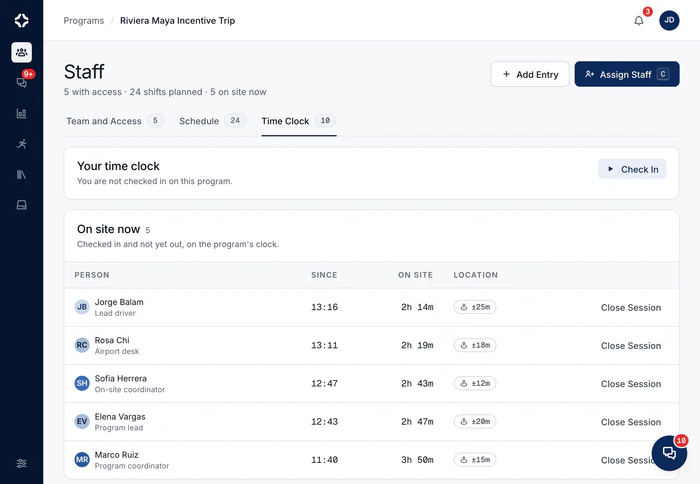
On-site work runs on freelancers, guides and drivers, and many will never install your app. Send each one a check-in link, or invite them to the app for free. They check in and out with their location. You get a live board of who is on site, and timesheets ready for payroll.
From punch link to payroll export
Send the link
One punch link per person: copy it or email it. Switch it off any time and the history stays, or let it expire. No accounts, nothing to download.
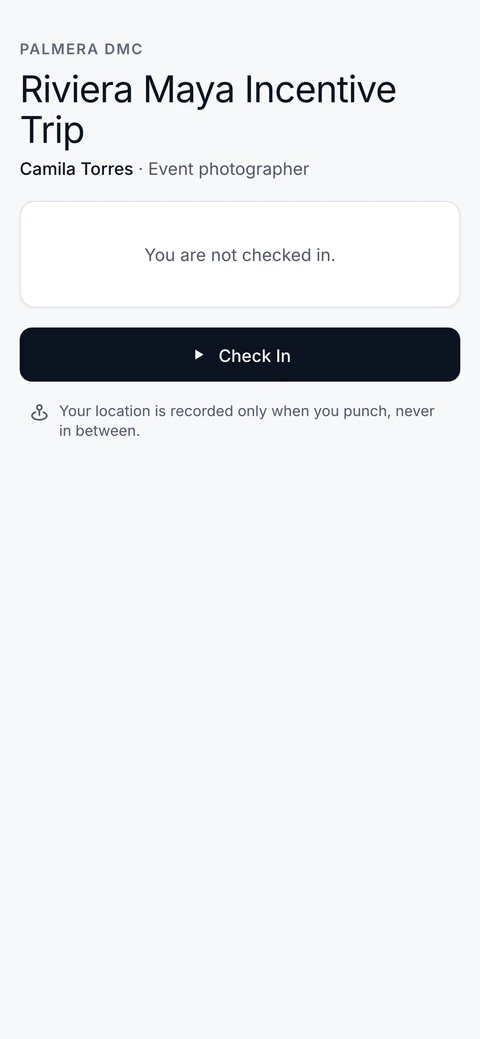
Check in with location
They check in and out, and the time and place are recorded. Check-ins from the app and entries made by hand are marked differently, and you see them on a map.

Accurate hours for payroll, without chasing timesheets.
Check-ins come from the phone in their hand.
Watch the board
The program's Staff tab shows who is on shift and where, right now. Shifts also appear on the run of show, on their own.
Export the hours
Timesheets with corrections, reasons and overnight shifts, exported to CSV for payroll.
Time tracking questions
Do freelancers need to install anything?
No. Each person gets a punch link: a web link that opens a check-in and check-out page with their name on it. Their location is recorded when they check in or out, with a map on your side. You can email or copy links, switch them off (the history stays) and set them to expire.
How are corrections handled?
In the open. Entries can be added or edited with a note giving the reason. Check-ins from the app are marked apart from ones entered by hand, and a shift that ends after midnight counts as one shift. Nothing is changed without a trace, so you can stand behind every timesheet.
Does it connect to payroll?
Timesheets export to CSV, with hours, corrections and notes, ready for whatever runs your payroll. DMC Pilot is not a payroll system. It makes sure the hours you pay are right.
Who counts as external staff?
Freelancers, guides, drivers and other on-site staff you assign to programs. They are managed alongside your employees, with the same punch links and the same board, but kept apart where it matters: rates, records and access.
Can a freelancer use the app instead of a link?
Yes. An External Staff record can be invited to the app in one step. A freelancer never takes a seat, and each plan includes a set number of them. They see only the programs they are assigned to: never money, your sales records, settings or the team. They check in from the program summary on the web, or from a shift card on their phone.
For freelancers and guides
Staff clock in from their own phone.
Send a check-in link, or invite them to the app for free. You get a live board of who is on site, and timesheets ready for payroll.


See DMC Pilot in a 30-minute demo.
A 30-minute call with our team, using data like yours. If it fits, we set up your price list, suppliers and first programs with you.