


Group airport transfer software for DMCsPlan group airport transfers from your guests' flights.
Airport transfer software for groups of any size: an incentive of 40 guests on six flights, or a congress of 600 on 41. DMC Pilot builds the transfers from the guests' flights, for you to approve, and sends them to the transport company. When a flight is late, the pickup moves, or is flagged if you already approved it.
How does a flight manifest become airport transfers?
Bring in the flights
Use the guest list you already imported for flight tracking. Each flight gets its status, expected arrival, terminal and any delay, checked every 10 minutes around departure and landing.
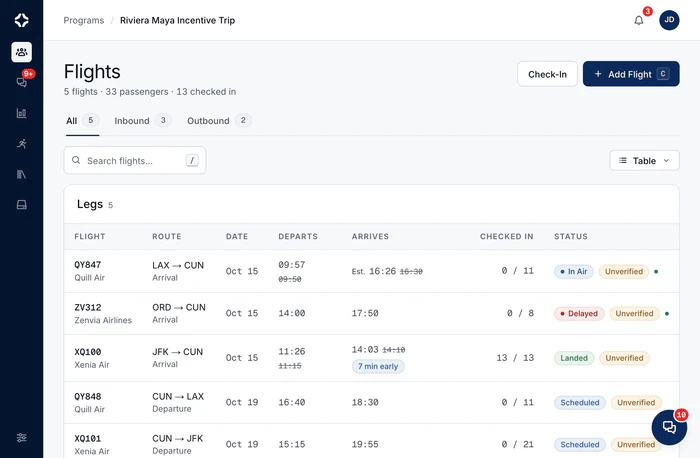
Group the guests
Guests are grouped by airport, arrival time and hotel, and fitted into your real vehicles by seats, luggage and accessibility. Rules on a guest group are followed, such as which vehicle types are allowed, or one party per vehicle. Each transfer shows the rule that shaped it.
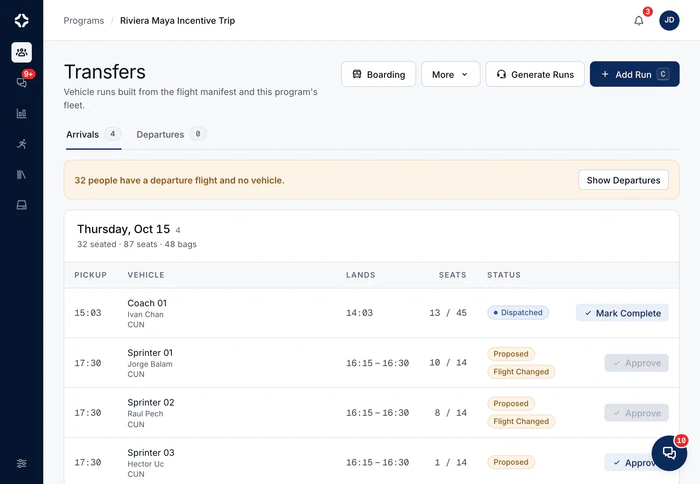

Coaches timed to when the guests actually land.
Pickups follow the flights, not the plan from last week.
Approve and send
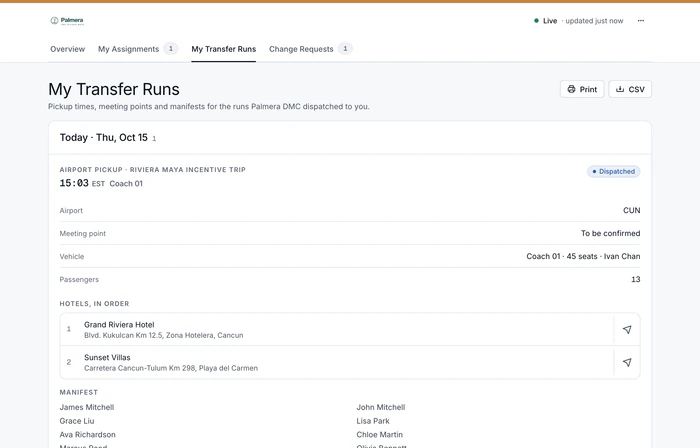
You approve each transfer, then send it. The transport company, one of your suppliers, sees it in its portal with names or a guest count, the meeting point and the times.
Watch and adjust
A delay moves a proposed transfer and flags an approved or sent one for you. An approved transfer is never moved on its own. The change is posted in chat, and the supplier gets a pickup-change notice to confirm.
Why not use a separate transfer app?
A flight tracker does not know your suppliers. A transport company adjusts pickups for its own vehicles, one booking at a time. A transfer list in a spreadsheet does not change when a flight does. To plan transfers for a whole group across your own suppliers, and check the plan again when one flight moves, you need the flights, suppliers, costs and guests in one place. That is what DMC Pilot is for.
The transfers are built from the flights that group flight tracking watches, and both are part of flight and ground operations for DMCs.
- Airport pickups and drop-offs, with time allowed for immigration and baggage
- Greeter notes, transfer notes, Fast Track and luggage marks on the supplier's run sheet
- Guests board by transfer from a check-in link, with a live boarding board for the office
- “Time to be confirmed” and “Meeting point: To be confirmed” are shown clearly, never left blank
- Terminals on every flight, and meeting points that name the exact spot, with directions for guests
- More than one hotel stay per guest, with a rooming list by night
- Plan the transfers again any time the guest list changes
- Arrival progress shows on the program summary and Client View
- Guests' access needs on each transfer and per guest, such as “1 wheelchair: vehicle needs a lift or ramp”, and on the boarding board
- Included on Growth, Scale and Enterprise
Group airport transfer questions
How are transfers built from the flights?
Arrivals and departures are grouped by airport and time. Then they are fitted into the vehicles you really have: seats, luggage space, accessibility needs, hotel stops and the rules you set for a guest group. You get a set of proposed transfers, each with its guests, pickup time and vehicle. You review and approve them before anything goes to the transport company. Anyone who does not fit is listed, with the reason.
What exactly happens when a flight is delayed?
The flight is checked every 10 minutes around departure and landing, and a change updates the flight. A transfer that is still a proposal gets the new pickup time. A transfer you already approved or sent is never moved on its own: it is flagged Flight Changed, and you change the time or move guests between transfers. The change is posted in the program chat. A pickup-change notice is drafted for the transport company, or sent on its own if you switch that on for the program. The company confirms it from an emailed link or in its portal, and your team is alerted if nobody does.
Will it ever move a VIP's car on its own?
No, and nobody else's either. A proposed transfer gets a new time. An approved or sent transfer is only flagged for you. A transfer that has already left is not touched. No guest is moved between transfers automatically. Software that quietly rearranged the chairman's car would be worse than a spreadsheet, so it never does.
What does the transport company see?
Approved transfers appear in its supplier portal, in your company's name. It sees the pickup time, meeting point, vehicle and guests, by name or as a number, as you choose. If a pickup has changed, a note says you will confirm the final time. The portal opens in a browser with a one-time code sent by email, so there is no password to remember. Freelance drivers and guides you invite to the app see the transfers of their own programs on their phone.
How do we plan for a guest who uses a wheelchair?
Record the guest's access needs once: their own wheelchair, a wheelchair to provide, step-free access, low vision, hearing or a service animal. Manifest import also reads columns like Wheelchair and airline codes such as WCHR and WCHC. Each transfer then shows what its guests need, for example “1 wheelchair: vehicle needs a lift or ramp”. The transport company sees the count and what you ask of it, never the guest's name.
At the kerb
When a flight is late, you see which pickup it affects.
Transfers are built from the guests' flights. When a flight is late, the pickup moves, or is flagged if you already approved it.


See DMC Pilot in a 30-minute demo.
A 30-minute call with our team, using data like yours. If it fits, we set up your price list, suppliers and first programs with you.