


Group flight tracking software for DMCsTrack every guest's flight automatically.
Import your guests' flights once, whether it is six flights for a small incentive or 41 for a congress of 600 guests. Each flight is checked every 10 minutes around departure and landing. Delays, gates, diversions and cancellations reach you without anyone looking them up. When a flight moves, its pickup is moved or flagged, and the day sheet and Client View follow.
10 min
between checks within three hours of departure or landing
7 days
ahead, the earliest a flight starts being tracked
3
file types the flights import from: CSV, XLS, XLSX
1
list of flights behind tracking, check-in, transfers and Client View
How does group flight tracking work?
Import and check
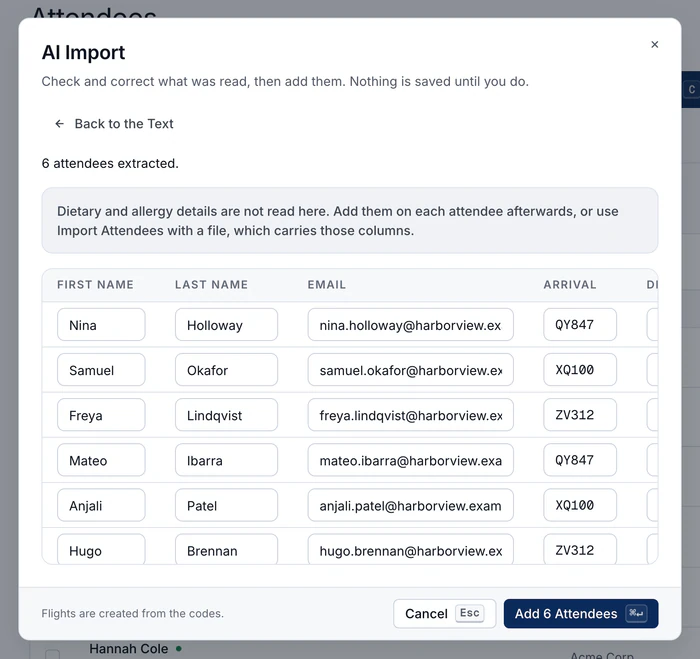
A spreadsheet, or a messy list pasted as text. Guests, flights and flight numbers are read for you. You check them, then save, and see them as cards or a table.
Checked every 10 minutes
Every 10 minutes within three hours of departure or landing, every hour on the day, and every six hours before that. Tracking starts up to seven days ahead, three by default.
Every flight on one board
Delays, diversions and cancellations, with expected time, gate, terminal and baggage belt on the board. Download the passenger list for anyone who wants paper.
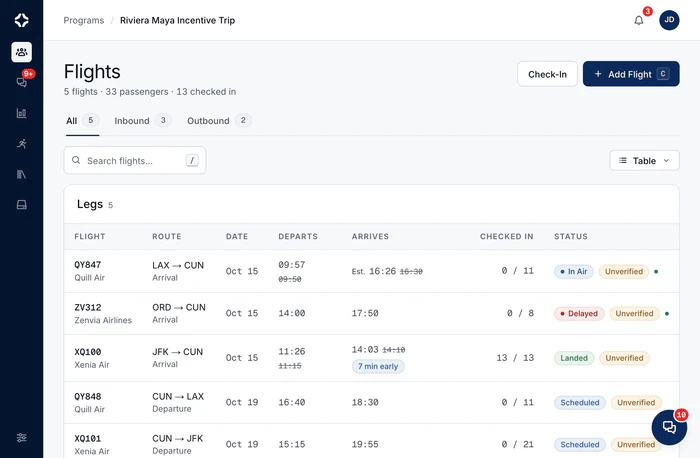

A late flight is updated once, for the whole team.
Nobody has to phone the driver, retype the day sheet or update the client.
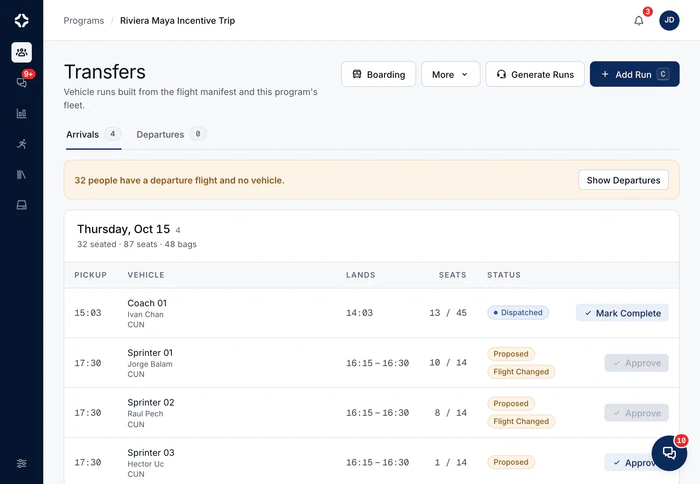
Airport transfers are planned straight from these flights
When a flight moves, its pickup is moved or flagged, and the day sheet and Client View follow.
Check guests in at arrivals
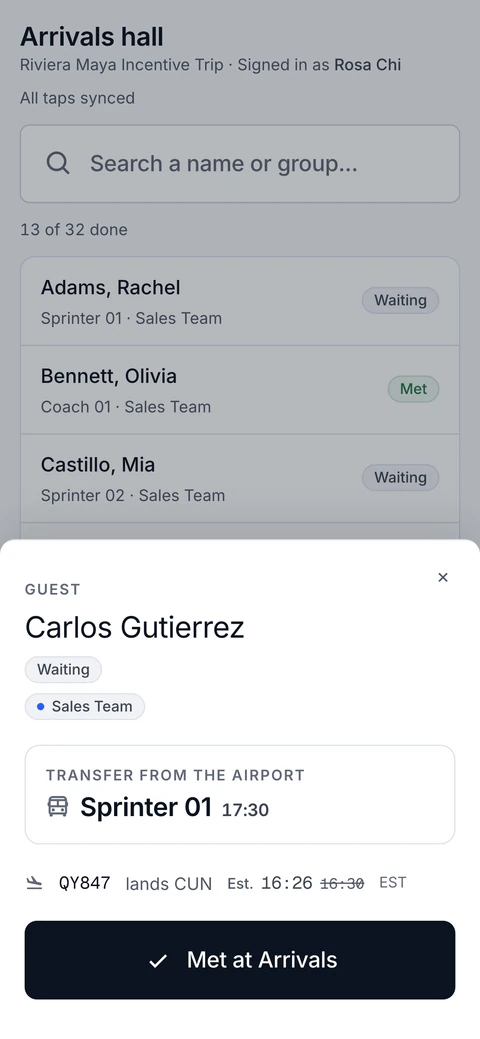
Greeters get a check-in link that updates every few seconds: search, tap the name, Met. Progress shows on the program summary and Client View.

Why track group flights in the same place as the program?
On an arrival day, everything depends on the flights: pickups, staff, the numbers for the first dinner and what you tell your client. A separate flight app can tell you a flight moved. Only a tracker inside the program can move or flag the pickup, and update the day sheet and Client View at the same time.
The same flights feed group airport transfers, and both are part of flight and ground operations for DMCs.
- Delays, diversions and cancellations, with expected time, gate, terminal and baggage belt on the board
- A monthly tracked-flight allowance on every plan
- Download the passenger list for anyone who wants paper
- Airport transfers are planned straight from these flights
- Included on every plan
Group flight tracking questions
How do the flights get in?
Two ways, both on the Attendees tab. Import a spreadsheet (CSV, XLS or XLSX): the columns are matched for you, with AI when needed, and you check before importing. Or paste a messy flight list as text into AI Import, and check it row by row before saving. The same list then feeds tracking, airport check-in, transfers and Client View.
How often is a flight checked?
Every 10 minutes within three hours of departure or landing, every hour on the day, and every six hours before that. Tracking starts up to seven days ahead, three by default. Delays, diversions and cancellations update the flight and flag the transfers affected. The board shows each flight's expected time, delay, gate, terminal and baggage belt. Each plan includes a number of tracked flights per month. On the Billing page you choose what happens after that: extra flights are billed, or tracking of new flights pauses.
What are Airport check-in links?
A link or a QR code for your airport team, with no account needed. The greeter types their name, and the link's password if you set one. Then they search by name or group and mark guests Met as they come out of arrivals. Every phone on the link updates every few seconds, and taps made without signal wait on the phone and sync later. A link can cover one flight, an airport's arrivals or departures, a set of transfers or an activity. Boarding guests onto their transfer is on Growth and up. The count shows on the program summary and in the arrivals on Client View.
Does the airline push updates to us?
No. DMC Pilot asks a commercial flight data provider, on the schedule above, and only for flights that still have a guest on them. Checking an imported flight number with the provider does not count toward your tracked-flight allowance.
Before the doors open
Flight status updates every 10 minutes, without anyone checking.
Each flight is checked every 10 minutes around departure and landing. Delays, gates and cancellations reach your team without anyone looking them up.

Run of show
A day sheet for each day on site, filled in from the program for you.
MoreAirport check-in
For the airport team: search a name, tap Met or Boarded, and undo if needed.
MoreAirport transfers
Transfer plans built from the flights, for you to approve. When a flight moves, the pickup moves too, or is flagged if you already approved it.
More
See DMC Pilot in a 30-minute demo.
A 30-minute call with our team, using data like yours. If it fits, we set up your price list, suppliers and first programs with you.