


Run of show software for DMCsYour day sheet, ready every morning.
Each program day gets a live day sheet, filled in from what the program already knows: who arrives when, which pickup moved, who is on shift, which supplier confirmed. You start each day from a sheet that is already filled in.
How each day sheet is built
Filled in for you
The day's rows come from events, flights, transfers, staff and supplier bookings, each with a time, an owner and its source. Events meant for certain team roles show only to those roles.
Make it yours
Add your own rows, hide what you do not need and change times. Every change is marked, and your changes always win. Undo any row with one tap.
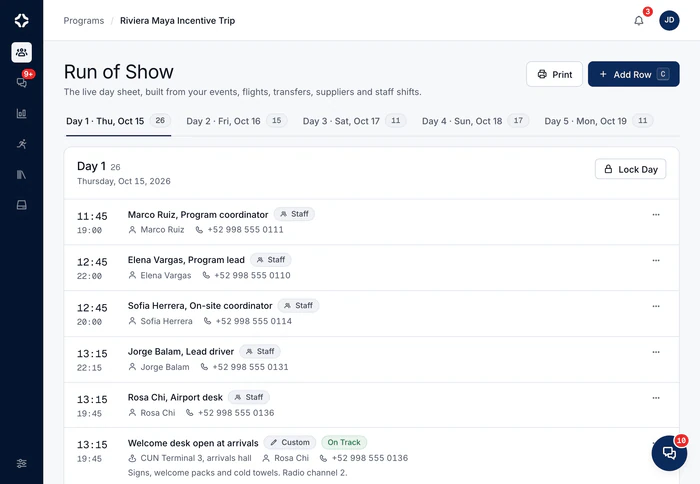

Everyone starts the day from the same sheet.
The one in the program, updated as the day moves.
Lock and run
Lock a day, and nobody can add, edit or hide its rows until someone unlocks it. Rows from flights and transfers still follow the latest times. An approved pickup that a flight moved is flagged for review, never changed on its own.
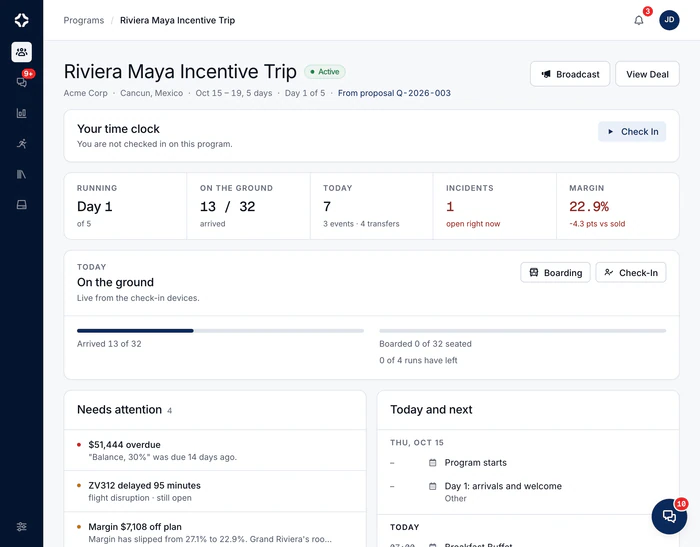
Changes to the program update the day sheet.
A run sheet built by hand starts going out of date the moment you save it. This one shows the live program. When the flight moves, the pickup row moves, because they are the same information. Nobody types anything twice: the sheet that holds the day together is filled in by the day itself.
- Edit, hide, delete or go back to the automatic version, row by row
- Events meant for certain team roles stay off everyone else's sheet
- Times follow your office's 12-hour or 24-hour choice, on the web and the phone
- A clean version can appear on Client View
- Printable, because paper still rides in the van
- Guests' access and medical needs on the rows they touch, with what to do, such as a vehicle with a lift or ramp
- Included on Growth, Scale and Enterprise
Run of show questions
Where do the rows come from?
From the program itself: events from the Events tab, arrivals and departures from the flights, pickups from the transfers, shifts from staff assignments, and supplier bookings with their call times. Each row shows where it came from. Add your own rows for anything else. Your own rows and edits always win.
What happens when something changes?
The sheet follows. A flight delay moves a pickup that is still a proposal, and flags one that is approved or sent for you to review. A supplier who has not confirmed yet is shown as such on its row. A flagged pickup and a locked day are posted in the program chat, so the team knows even when nobody is looking at the sheet.
Can I stop it changing during the day?
Yes. Lock the day, and nobody can add, edit or hide its rows until someone unlocks it. The lock is posted in the program chat. Rows that come from flights and transfers still follow the latest times, because a pickup that moved has moved. Changing a row, or undoing your change, takes one tap.
Does it work on a phone in a hotel lobby?
That is what it is built for. The phone app shows the day sheet in the program's own time zone. On the web you can print it, because some crew will always want paper. The paper is just no longer the master copy.
At the start of the day
The whole crew reads the same day sheet.
It fills itself in from the program: who arrives when, which pickup moved, who is on shift and which supplier confirmed.

Itinerary & events
The day-by-day plan of the program, connected to everything else.
MoreStaff time tracking
Staff and freelancers check in and out from their phone, with location.
MoreIROPS
A log of every issue and change on a program. For a flight disruption, it shows the flights, transfers and guests affected.
More
See DMC Pilot in a 30-minute demo.
A 30-minute call with our team, using data like yours. If it fits, we set up your price list, suppliers and first programs with you.