Event operations app for on-site teamsThe DMC Pilot app for your team on site.
The DMC Pilot app puts chat, the day sheet, transfers, guest check-in and IROPS (where you handle flight disruptions and issues) in the hand of the person running the day. Everything they do updates the same program the office is watching. The app is on every plan, for iPhone and Android, and each part appears where your plan includes it.
One app for iPhone and Android. It is on the App Store for iPhone and on Google Play for Android. It comes with your account: your team signs in with the email and password they already use, and nothing extra appears on the invoice.
1
app for iPhone and Android
1
set of program data, shared by phone and web
34
permission areas, the same as on the web
3
plans, and the app is in all of them
In the field
Your on-site team has the whole program on their phone.
Chat, the day sheet, transfers and guest check-in are on the phone. Everything they do updates the same program the office is watching.
01The mechanism
Updates made on site show in the office straight away.
This is not a separate app with its own copy of the data. A check-in tapped in the arrivals hall, a flight change confirmed at the curb and a voice note posted to the program channel all update the same program. The office watches them arrive.
One set of data, the same permissions, one change history
Live both ways: what the office changes is on the phone before anyone asks
DMC Pilot posts its updates into program chat, so the channel tells the story of the day
Nothing to export, and nothing to match up at the end of the day
What you tap on the phone updates the program the office sees. No separate copy of the data.
Four ways the app works the same as the web.
Each one is something teams have been burned by before: a second copy of the data, weaker permissions, a message lost in a dead zone, an extra charge.
01
The same data, not a copy
A guest checked in on a phone is the same guest the desk sees. With signal it lands at once. Without signal, the tap waits on the phone and is sent when the signal returns. Nothing to export, and nothing to match up in the evening.
02
The same permissions
The app signs in to the same company with the same account, and goes through the same checks on the server. A person who cannot edit transfers on the web cannot edit them on a phone either.
03
Nothing written is lost
A message written with no signal waits in its conversation, survives the app being closed, and sends itself, once, when the phone is back online. Check-in lists and issue logging work with no signal too: taps and issues wait on the phone and are sent, once each, when it is back. Everything else, such as a transfer change, needs the connection and says so when it fails.
04
No separate price
The same seat on the same plan, on every plan. Your people sign in on their phone with the account they already have, and nothing about it appears on the invoice.
What the app does, and what stays on the computer.
Many apps in this field squeeze the whole product onto a small screen, which is why people open them once. This one carries the work you do standing up, and leaves the keyboard work on the web. We drew the line on purpose, and we would rather show it than have you discover it.
In the hand
The work that happens standing up
Chat with the team, with voice notes when your hands are full and messages that wait for the signal
The day sheet for the program you are on, with what is happening now highlighted, and every row opening
Each run's terminal and meeting point, and each guest's hotel stays
Check-in at arrivals, onto a transfer run, at departures or at an activity, with or without signal
Transfer runs: assign the supplier, approve and dispatch, send a new pickup time when a flight moves
Log an issue the moment it happens, with photos, even without signal
Dietary needs by event, and a broadcast to everyone working the program
Companies: clients and suppliers in one tab, with the main contact first and one tap to call, WhatsApp or email
A supplier's insurance and licenses, and a photo of a new certificate read for you to check
Files and photos, uploaded from where they were taken
The time clock, for your staff and the freelancers you invite
At the desk
Deliberately left on the web
Building a proposal and laying out its blocks
Costing and margin
Invoicing, credit notes and the cash ledger
Configuring the organization, roles and permissions
Products & Services, the catalog of what you sell
Reporting across a season
Both columns work on the same data. Only the place you work changes.
02A day on the ground
Built for a full day on site, from early morning to the last coach.
The day sheet before the desk opens, the check-in list in the arrivals hall, the coach that is late, and an evening with nothing to write up. Everything was recorded as the day happened, by the people it happened to.
The day sheet is built on the server, so the phone and the web show the same one
Times are shown in the program's own time zone, never the phone's
A time zone label appears only when your phone's time zone differs from the program's
Everything posted from the floor carries a name and a time
06:10The day sheet for the program you are on, in the program's time zone, with what moved overnight already on it.
09:35Guests come through arrivals. You type a name and tap to mark each guest met, and the count on the office board moves as your taps arrive.
12:50A coach is late. Log it as an issue, send a voice note to the channel, and reassign the run. Everyone on the program sees all three.
23:40Nothing to write up. It was all recorded during the day, and tomorrow's sheet is already correct.
03Chat
Messages written without signal are sent when the signal returns.
The hotel basement, the coach in a tunnel, the arrivals hall with no signal: a message written there waits in its conversation with a clock beside it and goes by itself the moment the phone is back online. Conversations you have opened are kept on the phone, so they open at once and then catch up.
Kept through a restart, sent in order, and never sent twice
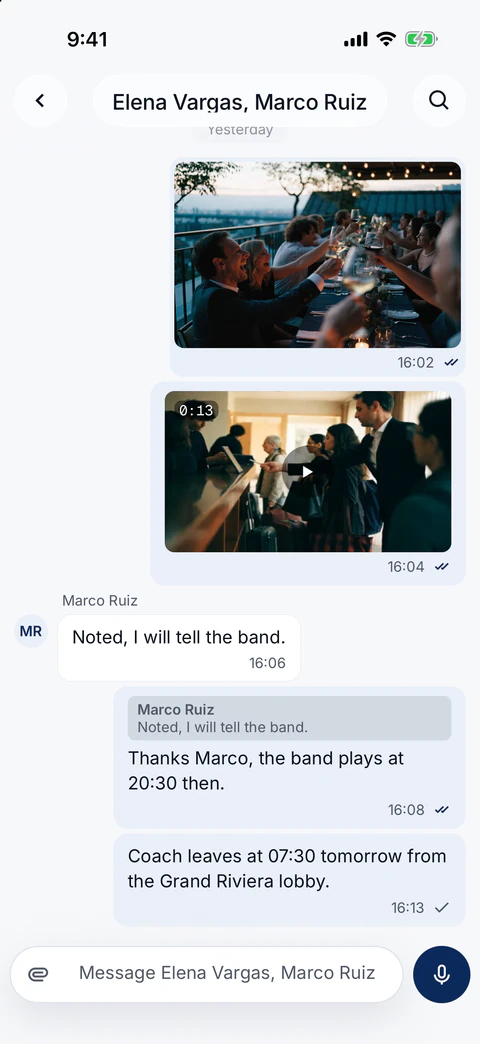
One tick when it is sent, two when everyone has read it, and Message info lists who has seen it
Reply, forward to up to five conversations, and each conversation's media, files and links in one place
Videos made smaller on the phone before they leave, with the size before and after on screen: a 30.8 MB video left as 3.9 MB in our tests
Attach from the camera, your photos, the Files app or Storage
Signing out deletes the conversations, drafts and unsent messages kept on the phone
On an iPhone: a photo, a video with its length, a reply, and the newest message with one tick until everyone has read it. Screenshot of the product with a fictional demo company.
Everything in the app.
The operational half of DMC Pilot, on the phone your team already has in their pocket.
Chat
Company channels, program channels and direct messages, kept on the phone so they open at once. A one-row message box that grows as you type, with the voice note button turning into Send at the first letter. Send several files in one message with a caption, and an unsent message follows you between phone and computer. Reply, forward, react and search, with read ticks and Message info. Pin the conversations you use most. Photos and videos made smaller before they leave, and files attached from Storage. Conversations mute individually.
Dispatch AI
The assistant built into DMC Pilot. Ask it in a program channel or on its own page, and it answers from your records, with the same permissions as on the web.
Programs and the day sheet
The programs you are on, with the run of show built for each day in the program's time zone. The day sheet highlights what is happening now and scrolls to it, and every row opens: flights, transfers and supplier bookings show their details, a contact card and only the actions that make sense, such as confirming a supplier booking. Key facts and what is next on the program's home, with Team, Suppliers and Events one tap away. Dietary by Event shows who needs what at each meal or activity, by event or by need, with severe allergies flagged.
Transfers
The transfer board for the day: assign the transport supplier, approve and dispatch a run, cancel, and acknowledge a flight change. Board guests onto a run by name and mark it departed when it leaves the curb, or mark it complete. Each run shows its terminal and meeting point, and each guest their hotel stays. A dispatched run posts to the program channel.
Attendee check-in
Check guests in at arrivals, onto a transfer run, at departures or at an activity: open the list, type a name and tap. Lists work with no signal, and each tap waits on the phone until it is sent. The count on the office board moves as your taps arrive, and two people checking the same guest is handled rather than silently overwritten.
Flights
Arrivals and departures for the program, with live status and each airport's time in its own zone. A late flight shows how many minutes late and its estimated time. Check a flight again, or set the arrival time yourself.
IROPS
Log an issue or a change note the moment it happens, with photos, even without signal: it is sent when the signal returns. Issues have their own list and detail, and items that need your attention open the item itself. Send a broadcast to everyone working the program; an urgent one still reaches people who muted the chat. When a flight moves, open the disruption to re-confirm every affected supplier at once, re-plan transfers and post a short note for your client. Each action asks first, says who will be told, and only appears for people allowed to do it.
Companies
Your clients and your suppliers in one tab, with one search for companies and the people who work there. Each client shows its own website icon, the main contact and quick actions first, key dates and follow-up cadence. Client contacts show office and mobile numbers, personal details and past site visits. Open a supplier to call, WhatsApp or email their contacts, see their insurance and licenses, and check which documents are about to run out. If you may edit suppliers, take a photo of a new certificate and DMC Pilot reads the details for you to check. A supplier booking can be marked confirmed or sent a re-confirmation request by email.
Files
The company drive, My Files and each program's drive, with previews, search and share links. Upload from the camera, your photos or the Files app; the original is kept, with a thumbnail.
Time clock
Your staff and the freelancers you invite check in and out of a shift from a card on their phone, with location captured at the moment of the punch.
Push and activity
The app asks about notifications once, during setup, and lists only the alerts you can actually get. Push for mentions, direct messages, Dispatch answers and ops alerts: team broadcasts, supplier pickup notices and the next-day dietary count, with a switch per kind in Settings. The badge respects muted conversations; a preview carries at most 140 characters of the message, and never an attendee record field.
iPhone and Android
One app for the phone your team already carries, in light or dark mode. It is on the App Store for iPhone and on Google Play for Android. No separate account to create.
Check-ins on the phone update the office count live.
Check-in is usually where the ground and the office lose track of each other. Here they share the same tap. When two people check in the same guest within a second of each other, the app sorts it out instead of quietly overwriting one of them.
Clients, guests and suppliers use a link, with nothing to install.
The app is for your own staff and the freelancers you invite. Everyone else gets a link or a portal. That is not a limitation we are apologizing for. It is the reason your suppliers and your clients actually use what you send them.
The app
Your team, with an account
Operations leads, coordinators, guides on payroll, and the freelancers you invite, who use it free and see only the programs they are assigned to. One install, their existing sign-in, the permissions their role gives them.
A link
Everybody else
Transport suppliers checking their runs in your supplier portal, guests signing a waiver, clients following Client View, photographers uploading an album, casual hires checking in for a shift. They open a link or a portal and get straight to work.
Mobile questions
Is it a separate product, or a cut-down version of the web app?
Neither. It signs in to the same company with the same account. It reads the same records and follows the same permissions and plan limits your people already have. A guest checked in on a phone in the arrivals hall is the same guest the desk sees. With signal the office sees it at once, and a tap made without signal is sent when the phone is back online. There is no second copy of the data to match up afterward. What it leaves out is the desk work, on purpose.
Why does it not do everything the web does?
Because a proposal builder on a phone is a worse proposal builder, not a more convenient one. Costing, invoicing, the Products & Services catalog and organization settings are jobs for a keyboard and a large screen, and pretending otherwise produces an app people open once. The app carries the work that happens standing up. That is the whole design.
Do drivers, guides and guests need to install it?
No, and that is deliberate. The app is for your own staff and the freelancers you invite, who use it free and see only the programs they are assigned to. Everyone else gets a link or a portal instead: a transport supplier checking its runs in your branded supplier portal with an emailed code, a guest signing a waiver, a photographer uploading to an album, a casual hire checking in for a shift. Each of them only needs the link.
What happens when the signal goes?
Chat, check-in lists and issue logging keep working, and everything else tells you. A message written with no signal waits in its conversation with a clock beside it, is kept if the app is closed, and goes by itself, in order and only once, the moment the phone is back online; one the server refuses says Not sent and offers Try again. Conversations you have opened are kept on the phone, so they stay readable and catch up on what you missed when you are back. A check-in list you have opened works with no signal too: taps wait on the phone, the screen says how many are waiting, and they go when the signal returns. An issue logged with no signal, photos included, waits the same way and is sent when the signal returns. Every other change, such as a transfer change, needs the connection and fails visibly without it, because on a program a write that silently did not happen is worse than one that told you so.
Is attendee data safe on a phone that gets lost?
Sensitive attendee detail is fetched for the screen and never written to the device's stored cache, so it does not sit on the handset after the app closes. The sign-in is encrypted on the phone, with its key kept in the phone's secure storage. Two things are kept on the phone: recent chat (messages, drafts and unsent messages), so conversations open at once, and the list of a check-in you opened, guest names and seats only, never contact or health fields, encrypted and destroyed after 16 hours. Signing out deletes both. Removing a member on the Team page ends their access on the phone the same way it ends it on the web, because it is the same account with the same permissions.
Does it notify people, or just sit there?
Push for the things that need a person now: mentions, direct messages, answers from Dispatch AI and ops alerts (team broadcasts, supplier pickup notices and the next-day dietary count), each with its own switch. Conversations can be muted individually, the badge count respects that, and an urgent broadcast still arrives. A preview carries at most 140 characters of the message: no attendee record field is ever put in a notification.
What does it cost?
Nothing extra. It is the same seat on the same plan, on every plan, including Core, and freelancers use it without taking a seat. Chat, check-in and Dispatch AI are on every plan; the day sheet, transfers, IROPS, broadcasts and the time clock appear on Growth and up, as on the web.
How does our team get it?
It comes with your account. It is on the App Store for iPhone and on Google Play for Android. They sign in with the email and password they already use, with two-factor codes where those are switched on. Organizations that enforce single sign-on use DMC Pilot on the web for now. There is no separate mobile license to buy and nothing to configure per device.
See DMC Pilot in a 30-minute demo.
A 30-minute call with our team, using data like yours. If it fits, we set up your price list, suppliers and first programs with you.