Team chat, file storage and permissions for DMC teamsTeam chat, files and permissions, built into every program.
Chat doubles as the program's timeline. Guests get files through safe links. Permissions do what they say, and every extra on the bill has a published price.
Chat doubles as the program's timeline, files have safe links, and each person sees what their role allows.
01Team chat
Each program has its own chat channel.
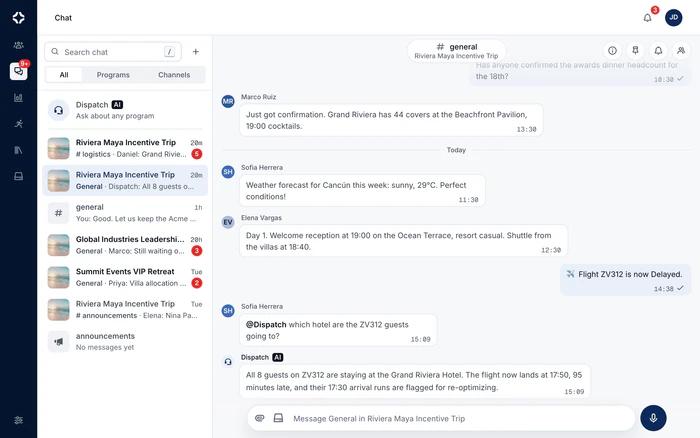
Company channels, program channels and direct messages, with the gestures your team already knows from WhatsApp: reply, forward, react, read ticks, voice notes and photo albums. DMC Pilot posts its own updates into program chat, so what happened and what was said sit in one place.
A transfer change, a flight delay or an accepted change request posts itself into the program's channel
@Dispatch answers inside the conversation, and suggests changes on Growth and up
Dispatch AI reads company and program channels, never direct messages or private channels
Company channels carry your company's icon
A one-row message box that grows as you type; files dropped or pasted attach with a caption and go as one message
An unsent message waits for you when you come back, even in another browser
“Is typing” is a company setting, on by default
app.dmcpilot.com/chat
Team chat: conversations by program, with Dispatch AI at the top of the list, and a program channel open beside them. Screenshot of the product with a fictional demo company.
02Messaging
Messages arrive instantly, and you see who has read them.
A message is on screen the moment you press Enter, before the server has answered. A conversation you opened before comes back at once, then fetches only what changed. The ticks come from each person actually reading, so Seen by is a fact, not a guess.
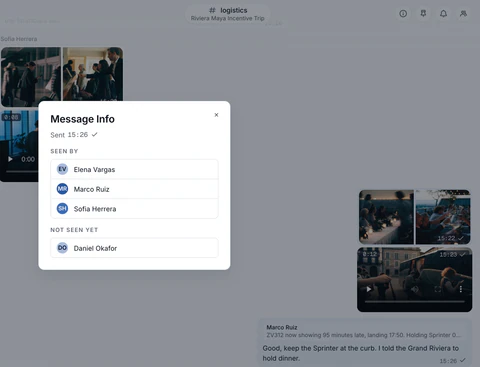
One tick when it is sent, two when everyone in the conversation has read it, and Message Info names who has and who has not yet
Reply to a message, and a tap on the quote takes you back to the original
Forward to up to five conversations at once; the copy says Forwarded
A draft stays with its conversation, and a message that did not go offers Try again
An unread divider where you left off, date separators, and a jump to the latest with a count of what arrived
A reply in a program channel, and its Message Info: seen by three teammates, not yet by two. Screenshot of the product with a fictional demo company.
03Photos, videos and files
Every file shared in a chat, in one place.
Drop a file anywhere on the page, paste a screenshot, or attach from Storage. Photos and videos are made smaller before they leave: in our tests a 27 MB video went up as 3.2 MB. The conversation's panel then keeps every photo, video, file and link together, with a search of that conversation.
Photos resized to no more than 2048 pixels, and videos converted to 720p in the browser. Where a browser cannot convert, the original goes
A video plays in the thread, with its poster frame and its length
Every upload shows its progress, with Stop and Try again
Attach from Storage sends a copy; Storage keeps the original
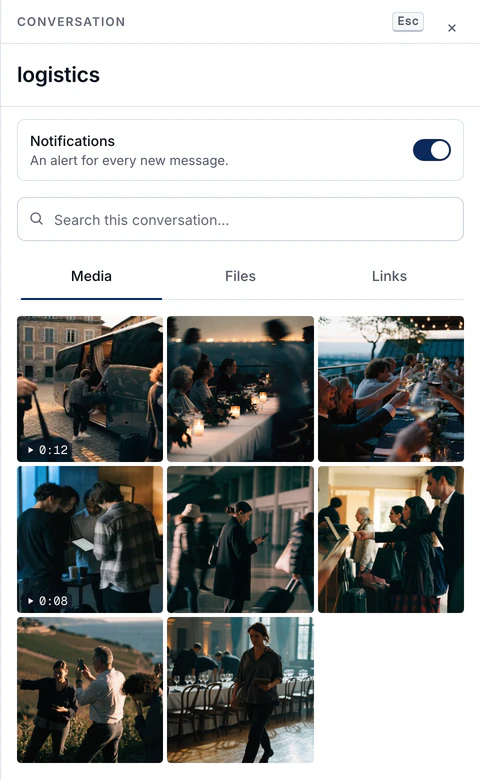
Media, Files and Links for each conversation, and a search inside it
A program channel's Media tab: photos, and videos with their length. Screenshot of the product with a fictional demo company.
04Mobile app
The same chat and files in the phone app.
One app, on the App Store for iPhone and on Google Play for Android, with the same account and permissions as the web. Chat, the day sheet, transfers, guest check-in and IROPS, in the hand of whoever is running the day. What they do on the phone updates what the office sees. The app is on every plan, and each part appears where your plan includes it, as on the web.
Check guests in from the manifest as they come through the hall
Assign the transport supplier, approve and dispatch a run, and confirm a flight change
Log an issue the moment it happens, and close it afterward
Freelancers you invite use it free and see only the programs they work
A message written without signal waits in its conversation and sends itself when the phone is back online
Four security checks on every request.
Hiding a button only changes what you see. Every request in DMC Pilot passes the same four checks on the server, in order. If any check fails, the request stops. A typed address, an old browser tab and a copied API call all end where a hidden link does.
01
Your data, kept apart
Each company's data is kept separate in the database itself. Another company's records are not just hidden from you: your account cannot reach them at all.
02
Role permissions
34 permission areas, each with view, create, edit and delete, plus special rights like seeing every program. Checked on the server, every time someone acts.
03
Program membership
People see the programs they are on. Someone who is not on a program does not get a grayed-out button. They get a page-not-found.
04
Your plan
Features outside your plan are closed at the page itself, not just hidden from the menu. Typing the address by hand leads to the same place.
The screens follow these rules. The server is what enforces them.
05Media library
One place to upload every photo, video and file.
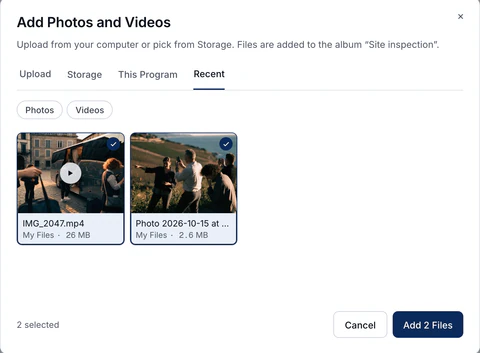
A message, a proposal cover, a line item photo, a service or supplier photo, a destination image, a catalog item, a gallery album and a program's files all open the same picker. Upload from your computer, or pick from Storage, the program's own files or what the team used recently. Nobody resizes anything by hand first.
Photos are resized for the screen and lose their location data before a client sees them: an 8 MB camera photo went up as 188 KB in our tests
Videos are converted to MP4 in the browser when they need it: a 27 MB 1080p clip went up as 7 MB
Every photo, video and PDF gets a thumbnail: a poster frame for a video, the first page for a PDF
A file picked from Storage is copied, not linked. A shared proposal never opens a door into your files, and deleting the original never breaks what a client already has
Storage itself keeps the original, untouched, with its thumbnail beside it
On the phone, a conversation offers the same choice: the camera, your photos, the Files app or Storage
Adding to a gallery album: two recent Storage files, a phone photo and a video, picked in one go. Screenshot of the product with a fictional demo company.
06Change history
Who changed what, from where, and what it was before.
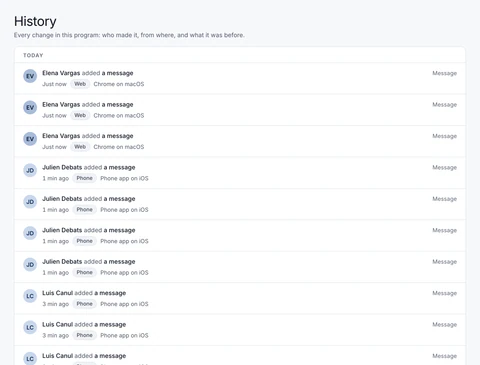
One timeline for the whole company, written in plain sentences, not codes. Each entry names the person, where the change came from (the web, the phone, a client or supplier portal) and the device. It keeps the value before and after. Every program, proposal, client and supplier has its own History tab.
Filter by date, person, area, action, record, program and place, with search
A detail view with the change, the IP address and the device
Health, ID documents, bank details and other sensitive fields are recorded as Changed, never the value
CSV export, itself recorded
Sign-ins, failed sign-ins, two-factor changes and role changes are logged too
A program's History tab: the place and the device on every entry. Screenshot of the product with a fictional demo company.
07Setup checklist
New companies start with a guided setup.
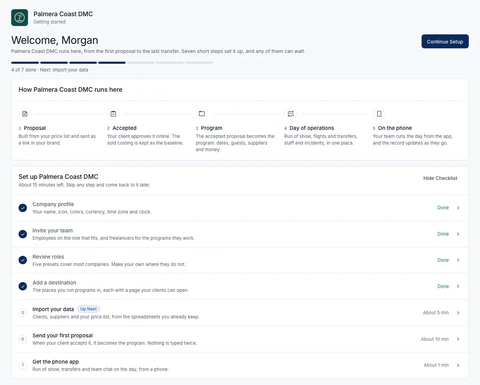
Your first Home page is a welcome and a seven-step checklist: company profile and icon, the team, roles, destinations, your data, a first proposal and the phone app. Progress comes from what is really set up, so it looks the same on every device and for every admin.
Every step can be skipped and reopened
Anyone who can do a step sees it, not only the owner
Empty lists point to the matching step or import
Data imports on Growth and up: CSV, Excel and PDF, up to 20,000 new records per import, reviewed and then confirmed with Confirm Import
It comes back from the Help menu whenever it is needed
A new company's Home, four steps in. Screenshot of the product with a fictional demo company.
Storage, permissions and billing, built in.
The part nobody shows in a sales pitch, and the part your team uses all day.
Storage
A company drive, your own My Files and one for each program: folders, previews, search, selecting many files at once, and share links with a password and expiry. Files keep their original quality, with a thumbnail beside each photo, video and PDF. Deleted files, proposals, programs and invoices can be restored from Recently deleted, for the period you set.
Roles & permissions
Six ready-made roles, Finance among them, and your own custom roles, built from 34 areas with view, create, edit and delete. Preview what each role sees. Freelancers join free and see only their programs. Two-factor sign-in is available to every user.
Billing & usage
Seats, programs, storage, AI credits and tracked flights, visible at all times, with a monthly allowance of tracked flights on every plan. You cap extra use, or switch it off. Invoice PDFs are where you would expect them.
Notifications & digests
Alerts in DMC Pilot as things happen, and an hourly email digest of anything you have not read. A client's change request on a proposal is emailed at once. A daily briefing waits in the app, and each person chooses how often it notifies them. Emails to your own team carry your company's name, logo and color.
Change history
Who changed what, from where, on which device, and what it was before. Filters, search, CSV export, and a History tab on programs, proposals, clients and suppliers.
Integrations & API
Flight data, Stripe, Mapbox and Cloudflare R2 built in, with an email address for each program on Scale and Enterprise. A sync to Xero or QuickBooks Online on every plan, which can also read payments back for your review. Connect your own AI assistant on Scale and Enterprise. On Enterprise, a Private API with signed webhooks, limited keys and every call logged, switched off until we turn it on for your office.
Every change, with a name and a time.
The change history records who changed what, from where and on which device, with the value before and after. Anything Dispatch AI changed is marked as automation, so it is always clear who decided what.
Because so much of a program is decided in conversation. Program channels hold the team's messages and the updates DMC Pilot posts, like a re-planned transfer or an accepted change request, in one timeline. @Dispatch answers questions in the channel. Company and program channels feed the knowledge base; direct messages and private channels never do. WhatsApp cannot do any of that, and it leaves no record you can check later.
How quick is chat, and what happens to a big video?
A message you send is on screen before the server has answered: in our tests it appeared 18 to 32 milliseconds after Enter. A conversation you opened before is kept in your browser. Switching back to it draws it at once, in about 11 milliseconds in our tests, and then fetches only what changed. Photos are resized to no more than 2048 pixels and videos converted to 720p before they go. A 27 MB video went up as 3.2 MB from the web, and on the phone a 30.8 MB video left as 3.9 MB. Where a browser cannot convert a video, the original goes instead. What chat keeps in your browser is deleted when you sign out.
How detailed are permissions?
There are thirty-four permission areas in eight groups: Operations, Sales, Money, Content, Guest-facing, Chat, Staff and Admin. Each has view, create, edit and delete, plus special rights such as seeing every program, or sharing proposals, files and galleries. Six ready-made roles (Owner, Admin, Manager, Finance, Employee, Freelancer) suit most companies, and custom roles cover the rest. Preview as This Role shows what a role will see before anyone gets it. People see only the programs they are on: anyone else gets a page-not-found, not a grayed-out button.
Can we share files with people outside the company?
Yes, when you choose to. A folder or file can be shared on a link with a password and an expiry date, and galleries have their own guest links. Sharing is itself a permission, so you decide who can create those links.
Do we have to shrink photos before we upload them?
No. Anything a client sees, such as a proposal cover, a line item photo, a service or supplier photo, a destination image or a catalog item, is resized to no more than 2048 pixels on the long side. It is turned upright, and its location data is removed. In our tests an 8 MB camera photo went up as 188 KB. Gallery photos keep up to 4K, because guests download them. Videos are converted to MP4 in the browser when needed; where a browser cannot convert, the original goes up instead. Storage is the exception, on purpose: it keeps the original file and adds a thumbnail.
Does a large client or supplier list slow it down?
No. Clients, suppliers and services are searched and paged on the server. A list in the thousands is never cut short, and never loads into your browser all at once. Tables let you choose 10, 25, 50 or 100 rows a page, and your browser remembers the choice for each table. The page you are on is part of the address, so a link you share opens where you were.
What integrations exist today?
Flight data from a commercial flight data provider: status is checked every 10 minutes within three hours of departure or landing, hourly on the day and every six hours before that. Stripe for billing, Mapbox for places and Cloudflare R2 for file storage. Emails go out in your company's name, logo and color, from DMC Pilot's sending domain. A sync that sends customers, invoices, payments and credit notes to Xero or QuickBooks Online is on every plan. It can also read payments recorded there, off by default, and each one waits for your review before it changes an invoice. An email address for each program comes on Scale and Enterprise, and Connect your own AI on Scale and Enterprise: a person connects an outside AI assistant after agreeing to what it can see. It reads the records that person may see, never health data, and suggests changes the person confirms inside DMC Pilot. The Private API comes on Enterprise: keys with set limits, every call logged, that read and write programs, clients and contacts, suppliers and rate cards, and service templates, plus signed webhooks. API access is off for every company until DMC Pilot turns it on for that office. Connect your own AI needs it too, along with two-factor sign-in for the person connecting.
See DMC Pilot in a 30-minute demo.
A 30-minute call with our team, using data like yours. If it fits, we set up your price list, suppliers and first programs with you.