

Proposals & contracts
A password and expiry date for each link, your accent color and cover, and a signature pad at the end. Contracts are signed from a private link, and your sales team sees when each proposal is opened.
Your client gets Client View, a live page for their program, and branded proposals to approve. Their guests get the photo galleries by private link. Every link carries your company's name and icon.
1
link for your client to follow the whole program
0
cost figures your client can see
4
things your client opens, all in your name
452 of 600
guests arrived: what your client shows their own leadership
With your client
Client View is a live page in your company's name. Your client sees guests arriving and the day's schedule without having to ask.

01Client View
Give your client a live page for their program, with a password if you set one. They see guests arriving, today's schedule, travel updates and the proposals they approved. It refreshes every 15 seconds while it is open, and your margin never appears on it. Inside a program, it is the Client View tab.
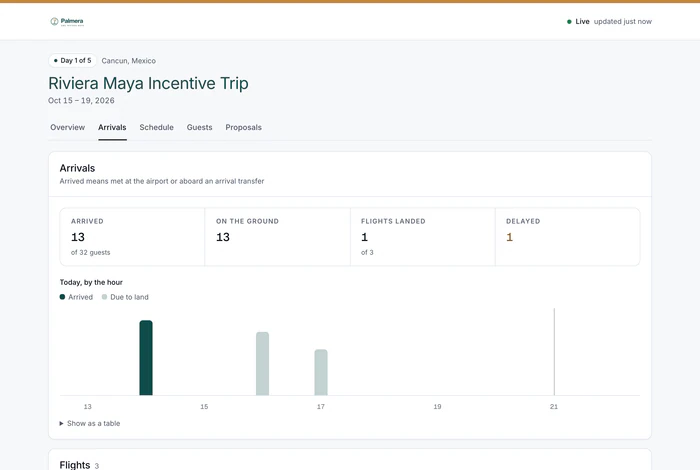
Everything your client sees is built from what they pay. Supplier costs and your margin are left out of every client page and every client export. Your costs stay with your team.
Stays with your team
What your client sees
Four things your client and their guests open. Proposals and presentations carry your logo, colors and fonts. The rest carry your company name and icon, in a neutral design. None of them carry ours.
A password and expiry date for each link, your accent color and cover, and a signature pad at the end. Contracts are signed from a private link, and your sales team sees when each proposal is opened.
Slide presentations, one per destination, built with your own images. Share each one as a link in your brand, with an optional expiry date.
Albums for each event, with download links for guests and optional passwords and expiry dates. Photographers upload from a link, with no account.
Guests sign waivers from a link. Greeters run Airport check-in from check-in links. Guests and greeters only need the link.

Photographers upload from a link, with no account. Guests download from a link, with no account. Turn on approval for an album, and nothing reaches guests until someone on your team approves it.
Yours. Proposals and destination presentations carry your logo, colors and fonts, with an accent color and cover for each proposal. A proposal opens in the design you choose from six, each previewed in your brand. Client View, galleries, waivers and check-in pages carry your company name, icon and link preview, in a neutral design with nothing of ours. Emails to your client go out under your company's name and logo, from our sending address. Your client should never need to know who makes your software, so we stay out of sight.
No. Client View, and everything else your client sees, only ever receives what the client pays. Supplier costs and your margin are never sent to them. It is not a hidden column: the server keeps those numbers back, so they never reach your client's screen.
Not to follow a program. Clients get a link to Client View, with a password if you set one. Guests get private links for galleries, waivers and check-in. Photographers get an upload link. Client View, proposal and gallery links can have an expiry date, and you can switch off a client page link at any time. Client contacts you invite can also sign in to the client portal, a page in your company's name. They sign in with a one-time link sent by email, never a password, and see all their programs.
Duty of care. Under ISO 31030, incentive guests traveling for their employer fall under travel-risk management. “452 of 600 guests arrived, everyone is accounted for” is something your client can show their own leadership. After the trip, on Growth and up, you can publish a client version of the after-event report on the same link. Most DMCs cannot offer this. You can.

A live page with their name on it is the strongest slide in your pitch. See how it looks with your branding in the demo.