


AI for destination management companiesAn assistant that knows your programs, and asks before it changes anything.
Dispatch AI, the assistant built into DMC Pilot, answers from your programs, suppliers and finances. It drafts changes for your team to approve, and reads your email so nobody retypes it.
12
kinds of change it can draft for your approval
1
person's OK before any change is made
0
prices set by the AI
7
AI features in DMC Pilot
At the operations desk
Ask one question instead of searching five screens.
Dispatch AI answers from your programs, suppliers and finances, and drafts changes for your team to approve.

One exchange, end to end
Every answer shows where it came from.
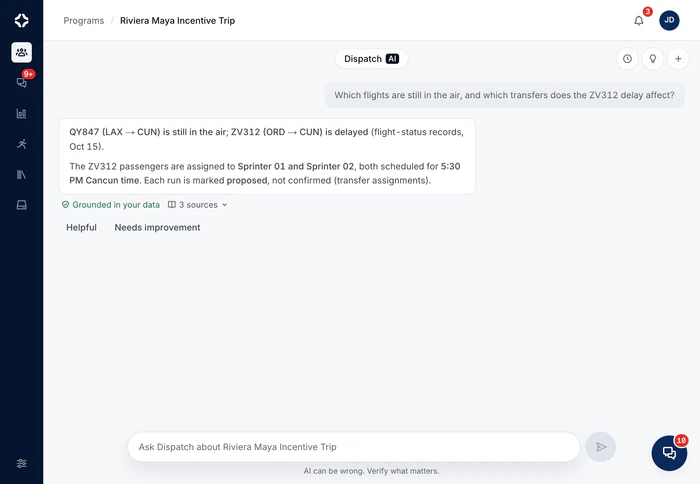
In operations, an answer you cannot check is a risk. Every specific answer from Dispatch AI shows the records it read. Anything that would change your data stops at a card that someone with permission has to approve.
- Answers show the records they came from
- The whole company, or one program tagged with #
- Changes wait for someone allowed to make them
38 showed up for the Day 2 sunset cruise. Can you record that?
The sunset cruise is planned for 42 guests with Atlas Marine on Day 2. Here is the change, for you to confirm.
Grounded in your data2 sources
Needs your confirmation
Record 38 as the actual headcount for the Day 2 sunset cruise
It updates the planned service already on the program. Nothing changes until you press Confirm.
01Dispatch AI
Answers that show their sources, and changes that wait for your OK.
A floating assistant on every page, and a full workspace when you need it. Ask about your whole company and get an answer that shows its records. When Dispatch AI suggests a change, a person with permission approves it, every time.
- The whole company, or one program tagged with #
- Every conversation is kept, to pick up again, search or archive
- Tell it how you like to work, and see or remove what it remembers
- Each question is checked before it is answered, and each answer is checked against the records it cites
- Reads guests, flights, hotels, transfer runs, check-in, suppliers and finances, and shows its sources
- Twelve kinds of change it can draft, from recording final numbers to marking payments
- A change only goes in if the person approving is allowed to make it by hand
02AI inbox
Forward the email, then review what it found.
Every program gets its own email address, and your company gets one supplier inbox. Each email is labeled by type and urgency, and flagged when it needs a reply. The AI inbox picks out the changes it asks for and shows them beside the original email. It also checks the sender against your contacts.
- Labels each email: confirmation, change, cancellation, invoice, quote, question and more
- Urgent, Emergency and Needs Reply badges. Empty attachments, like signature logos, are skipped
- Known contacts confirmed; unknown senders flagged, never trusted
- On a supplier's change request, the new cost and client price are filled in for you
- Nothing changes without review: you tick the changes to apply, and only those go in
It suggests changes. You approve them.
This order is how DMC Pilot works, not a stage on a roadmap. A routine task earns automation on your terms, and some things never do.
AI suggests
Details read from email, transfer plans, drafts and final numbers arrive as suggestions, with the evidence attached. Never as quiet changes.
A person approves
Anything that touches a supplier, a guest or money is confirmed by someone allowed to make that change by hand.
Trust is earned
Routine work gets a one-click apply: the changes you tick on a reviewed email go in together. Changes to costs or guests always stay with a person.

The AI chooses and describes. It never sets a price.
Every price in a Dispatch AI draft comes from your own Products & Services list. Where there is not enough data for an insight, DMC Pilot says so instead of guessing.
Everything in Dispatch AI
Dispatch AI questions
What can Dispatch AI answer?
Anything your records hold, such as “Which suppliers handle catering?”, “How many attendees have dietary restrictions?”, “Summarize our active programs” or “What is our cancellation policy?”. Ask about the whole company, or tag a program with # to answer from that program's live details. Each program also keeps its own Dispatch AI conversation. Answers come from your data, read with your own permissions, and show the records they came from. Dietary and allergy notes are read only when a lawful basis for health data is recorded on the program, and each such read is logged.
Can it take actions, and who approves them?
On Growth and up, Dispatch AI can draft real changes: record a final number, log a call or meeting, set how often to follow up, or mark a payment. Each one arrives as a card to approve, and the person who asked approves it. For cards Dispatch AI raises by itself, such as a final number or a payment, anyone allowed to edit that record can approve. Nobody can approve a change they could not make by hand. Every change from the AI is marked as automation in the change history. The questions and answers themselves stay in the conversation and are not written to the change history.
What does Dispatch AI know about us?
What you let it. The knowledge base covers documents you upload and your company and program chat channels, never direct messages or private channels. It also covers your clients, contacts, deals, interactions, proposals, programs and suppliers. Each person gets answers only from what they are allowed to see. AI memory learns four kinds of things from conversations: preferences, dislikes, facts and context. You can see each item and delete it, and each person can switch learning off for their own conversations.
Does it ever make up prices or numbers?
Prices never come from the AI. They come from your own Products & Services list: the AI chooses and describes, but never sets a price. Answers are checked against the records they cite. Where there is not enough data for an insight, DMC Pilot says so instead of filling the space. There are no sample numbers anywhere.
How is AI usage billed?
AI use is counted in credits, with a monthly allowance for the whole company on every plan. As a rough guide, Core's 80,000 credits cover about 1,000 AI requests a month and Growth's 225,000 credits cover about 2,000 AI requests a month and Scale's 500,000 credits cover about 6,000 AI requests a month. A quick question uses a few credits, and a long document or a detailed request uses more. You can buy extra packs, turn on auto-refill, or cap extra use. If credits run out, AI features pause after five days' grace. The rest of DMC Pilot keeps working as normal.
Can we connect our own AI assistant?
Yes, on Scale and Enterprise, with Connect your own AI. A person connects an outside AI assistant after agreeing to what it can see, and can disconnect it at any time. The assistant reads the records that person may see. It can suggest changes, which the person confirms inside DMC Pilot. Health and dietary data is never available to it. It needs API access switched on for your office by DMC Pilot, and two-factor sign-in for the person connecting. It works with Claude and ChatGPT. When connecting, the person chooses what the assistant may do: reading is always on, suggested changes are on unless they untick them, and guest contact details and money stay off until they tick them.

Ask a question your current tools cannot answer.
On the demo, ask your hardest operations question. We show how Dispatch AI answers it from a sample company's data, and where each answer came from.