
DMC Pilot update logWhat's new in DMC Pilot.

New features, improvements and fixes as they reach your team, newest first.

For your team

New things arrive in the app your team already uses.

New features, improvements and fixes as they reach your team, newest first.

A coordinator walking through a venue foyer, glancing at her phone

DMC Pilot on iPad

The DMC Pilot app now runs on iPad, built for the bigger screen. A navy rail on the left takes you between your spaces, and lists open beside their details, so you can work through a guest list or an inbox without going back and forth.

  • Office work comes with it: sales and deals, proposals, invoices and supplier bills, insights, operations, the library, team and roles, and your company settings.
  • The After-Event Report and proposal commissions are on the iPad, where there is room for them.
  • Android tablets get the same layout.
Program reference numbers on the phone and iPad

Program references show on your program cards and the program home. On the iPad you can set up automatic numbering in Settings, and change a program’s reference in its Settings.

Program updates go to the program's team

Notifications about a program, in the bell, by email and on the phone, now go to the people on that program’s team whose role covers what they are about. Add people to a program’s Team to keep them informed. When someone leaves a program’s team, its notifications leave their bell too.

The phone app opens faster and follows your role everywhere

  • The app opens straight into your last account, in about half the time.
  • Every screen follows your role, wherever you open it from: a link, a notification or search. Something your role does not cover says so calmly and shows you the way back.
  • Serious flight problems and incidents on your programs reach your phone with the next step to take.
  • Sends say what happened, Undo is there after a delete, and buttons and messages read the same way across the app.

Email invoices to clients, and see what was delivered

  • Send an issued invoice to your client from its page, with a preview, the recipient you choose and the PDF attached, in your brand.
  • Proposal and invoice emails show whether they were delivered or bounced. When a proposal email could not go, you see why and can copy the link instead.
  • The person who approves a proposal gets a receipt with a link to the approved version.
  • A client can give a reason when they decline a proposal.
  • Withdraw a change you asked a supplier for, and they are told by email.
  • Undo a recorded invoice payment, kept apart from refunds.

Know sooner when an arrival day goes wrong

  • A canceled or diverted flight, or any serious issue logged on a program, now reaches your team’s phones with the next step, such as “AF123 canceled, 38 guests. Re-plan transfers in IROPS.”
  • If a supplier has not re-confirmed a service about a day before it starts, your program team is told once, with the supplier’s phone number.
  • The day sheet shows how many of tomorrow’s suppliers have not confirmed yet.

Undo more, and bring back deleted guests and events

  • Deleted attendees and events now wait in Recently deleted in Settings, where you can restore them.
  • Undo right after deleting a guest or an event, archiving a deal, client, prospect or supplier, moving a deal, or dismissing a supplier’s reply.
  • Buying AI credits asks first and names the card. When you reach a plan limit, the message shows your count and opens Billing.
  • Saves now confirm, and an import that stops part way says how many people were added. Running it again skips them.

Reference numbers for your programs

Give every program a reference such as 2026-001 or ECO2026-APR-001A. In Settings, under General, turn on automatic numbering and build your own pattern from the year, the month, a running number and your office code, with any letters of your own. Choose whether the number starts again every year, every month or never, and continue from your last number if you are moving from another system.

Prefer to number by hand? Type a reference on any program in its Settings. A reference is never used twice in your company, and you find programs by it in the program list and in search.

Your daily briefing arrives at 9 in the morning, your time

The daily briefing, client follow-up reminders and plan usage warnings now arrive at 9:00 in your office’s time zone, wherever you are. Times inside these emails follow your office’s clock too. Set your time zone in Settings, under General.

Planner invoices on a program's Financials page

Recording a meeting planner’s commission invoice on a program’s Financials page works again.

Tightened access checks in chat

Chat notifications and changes to messages now follow each person’s role and your plan in every case.

Deleted programs leave your Supplier Portal

When you delete a program, its bookings, transfer runs and change requests now leave the Supplier Portal straight away. Your suppliers no longer see them waiting for confirmation, they no longer count toward what needs their attention, and a page left open cannot confirm them. Bills a supplier already sent stay in their list, so their payment record stays complete.

Start a program from your past programs

Running the same incentive again next year? Copy an earlier program to new dates and a new group size. The schedule moves to the new dates, and per-guest quantities follow the new group, so a 42-guest trip can become a 90-guest one in a few steps. Services come in at today’s prices from your catalog, with the old price shown where it changed. Suppliers come across waiting for a new quote. Guests, flights, money and messages are never copied, and you review everything before anything is created. Copying a program is on every plan.

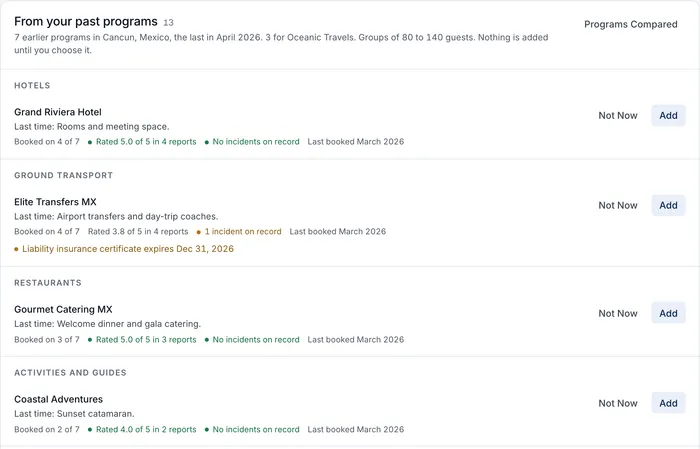
On Growth, Scale and Enterprise, a new program also shows suggestions from your similar finished programs: same destination first, then the same client, a similar group size and season. You see the suppliers you used and how often, their After-Event Report rating and any incidents on record, services at today’s price, the transfer vehicles you used, staffing per 100 guests, and approved lessons from past issues. You add each suggestion one at a time. Nothing is added for you. Suggestions appear once you have at least 2 similar finished programs.

From your past programs on a new Cancun program, with hotels, transport, restaurants and activities used before, how often, their report rating and incidents on record, each with Not Now and Add.
Screenshot of the product with a fictional demo company.

A new Growth plan, and Scale for larger teams

There are now four plans. The new Growth plan has every operations tool, from airport transfers and run of show to Client View and margin alerts, for teams of up to 15 people. It sits between Core and Scale.

Scale is the plan that used to be called Growth, with the same seats, programs and storage. It adds the AI inbox, RFP response and Connect your own AI. If you were on Growth, you are now on Scale and nothing you use has changed. All prices are on the pricing page.

A Help Center for every screen

DMC Pilot now has a Help Center with step-by-step guides and screenshots for every screen and setting, from accepting your invitation to closing a supplier account. Search it with a question in your own words, or browse by topic.

Open it from your account menu or the command menu (Help Center). It opens on the guide for the screen you are on, already signed in. Only your team can read it.

Guest access and medical needs, wherever your team works

Record each guest’s access needs: brings their own wheelchair, needs a wheelchair provided, step-free access, low vision, hearing, or travels with a service animal. You can also flag a medical need or a severe allergy. Private notes are seen only by people with guest privacy access.

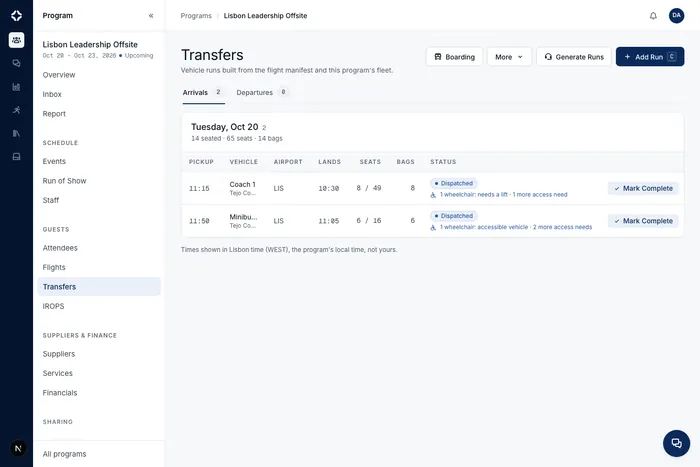
The needs then show where your team works: on each transfer run and per guest (for example “1 wheelchair: vehicle needs a lift or ramp”), on the boarding board, at check-in, and on the day sheet with what to do. Dietary by Event and the kitchen export include them too. Suppliers see counts and what you ask of them, never names. The client page shows counts only.

When you import a manifest, columns like Wheelchair or Medical are read, and so are airline codes such as WCHR, WCHC, BLND, DEAF, SVAN and MEDA. On every plan.

Transfers for a fictional Lisbon program, where each arrival run shows its guests' access needs, such as 1 wheelchair, needs a lift.
Screenshot of the product with a fictional demo company.

Contact support from the Help Center

You can now write to the DMC Pilot support team from the Help Center. Press Contact support at the top of any page or at the end of any guide, say what you need, and add screenshots if they help. Your name and company go with your message, you get a copy by email, and the team answers you by email. If you would rather chat, the same page has a WhatsApp button.

Open it from DMC Pilot too: Contact support is in your account menu and the command menu.

Money across all your programs on one page

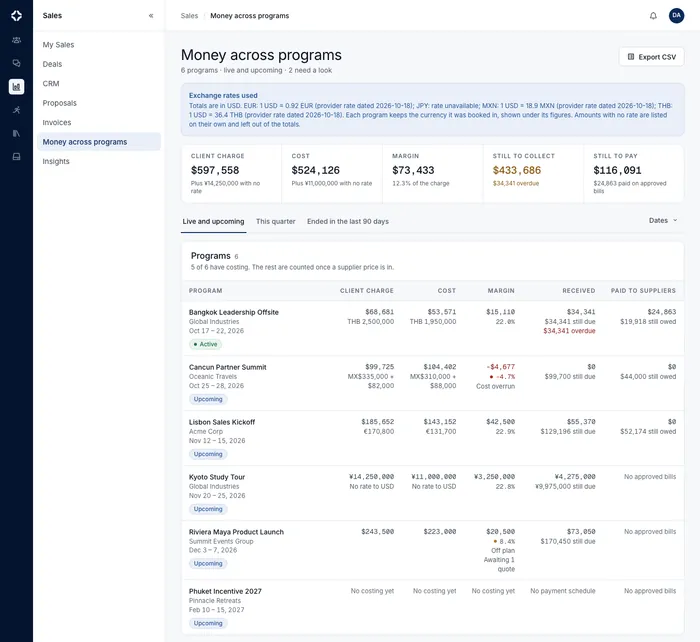
A new page in Sales shows every live and upcoming program with its client charge, cost and margin, what you have received and what is still due (overdue amounts are marked), and what you have paid suppliers and still owe. Totals are converted to your company currency at the stored rate, and the rate is shown. A program with no costing says “No costing yet” instead of showing zeros.

Sort by lowest margin to see which program needs a look first. Switch between live and upcoming, this quarter, and programs that ended in the last 90 days. Export it all to CSV.

Money across programs with totals in US dollars, the exchange rates used, and six fictional programs with client charge, cost, margin, received and paid to suppliers.
Screenshot of the product with a fictional demo company.

Connect Claude or ChatGPT, and choose what it may do

Connect your own AI assistant works with Claude and ChatGPT. The assistant can read programs, guests, flights and suppliers, and suggest changes that you confirm in DMC Pilot.

When someone connects, they choose what the assistant may do. Reading is always on. Suggested changes are on unless they untick them. Guest contact details and money stay off until they tick them. An assistant can never do more than the person’s own role allows, and two-factor sign-in is required. DMC Pilot switches on access for your company first.

Ask Siri about your programs

On iPhone, ask Siri “What’s on today in DMC Pilot”, “What needs attention in DMC Pilot” or “When does the group arrive in DMC Pilot” and hear a short answer. Siri can also find and open a program, a company, a supplier or a contact, and pass a question to Dispatch.

When a flight is delayed, canceled or diverted, Siri can tell you what moved and help you act: tell the supplier the new pickup time, re-confirm suppliers, approve or dispatch a transfer. Siri always reads out exactly what will happen and who will be told, and does nothing until you say yes.

You only hear what you can already see in DMC Pilot. Siri never says prices, guest names, health details or phone numbers, and nothing is said while the phone is locked. On Android, press and hold the app icon for Today, Ask Dispatch and your running programs.

It is off until an owner turns on “Siri and Gemini on the phone” in Settings and each person turns it on in the phone app. With AI Connections, the same answers are also available in the Gemini app.

Clients and suppliers together on the phone

The Clients tab on the phone is now Companies: your clients and your suppliers in one place, with one search for companies and the people who work there.

Open a supplier to call, WhatsApp or email their contacts, see their insurance and licenses, and check which documents are about to run out. If you may edit suppliers, take a photo of a new certificate or pick it from Files, and DMC Pilot reads the details for you to check and save.

Client contacts now show office and mobile numbers, family, diet and personal details, and past site visits.

Show us what to change, right on the screen

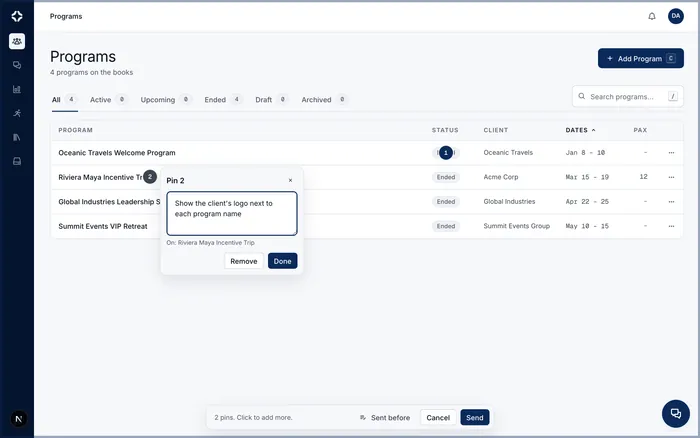
Press Feedback at the bottom right, click anything you would like changed, and write what you have in mind. Add as many pins as you need, then send them with a picture of the screen, so we see exactly what you see.

Under Sent before you can follow every pin you sent: Accepted, In Progress or Done.

Feedback pins work on a computer. We are turning them on for our early-access customers first; ask us if you would like them for your team.

The Programs screen with two numbered pins, one note open saying "Show the client's logo next to each program name", and a bar at the bottom to send them.
Screenshot of the product with a fictional demo company.

Handle flight disruptions from the phone

Everything you need when a flight moves is now on the phone, where you already look at it. On Transfers, send the new pickup time to the supplier or keep the old one. On a flight, check it again or set the arrival time yourself. On a disruption, re-confirm every affected supplier at once, re-plan transfers, and post a short note for your client.

Each one asks first and says who will be told, and only appears for people allowed to do it.

Dispatch keeps your conversations and remembers how you work

Dispatch now keeps every conversation you have with it. Open Conversations to pick one up again, search by name, start a new one, or archive the ones you are done with and bring them back later.

Tell Dispatch how you like to work (“remember that I prefer short checklists”) and it follows that from then on. You can see, change or remove what it remembers under Memory, and a lesson drawn from a resolved incident shows there once someone on your team has reviewed it.

When Dispatch offers to do something for you, it shows exactly what it will change and waits for your yes.

Client logos on their documents, and a place for their files

Upload a client’s logo on their company record and it appears beside yours on the proposals and agreements that client receives, and in their client portal. It is on by default; you can turn it off for your company in Settings, or for a single proposal in its design.

Each client also has a Files tab for reference material, such as a previous program or a brand guide, next to the files from their programs.

Whole amounts, for companies that do not work in cents

If your company quotes in whole dollars, turn on whole amounts in Settings, under Proposals. Totals and per person prices are rounded up to the whole amount on proposals, agreements, invoices and contracts, on screen and in the PDF, and the parts always add up to the total shown.

It applies to what you send from then on. Anything already sent keeps the amounts it was sent with.

Your own client categories

Keep your own list of what kind of client a company is, such as Corporate Direct, Third-Party Planner or Association. Pick one when you add or edit a company, see it on the CRM list, and filter by it. Manage the list under Settings, Client Categories.

Commission on a deal from day one

When a planner brings you a lead, record their commission on the deal as soon as you enter it. The proposal you create from that deal starts with the same commission, and commission agreements can now carry a reference number. Commission stays private to your finance team: your client never sees it.

Program agreements in the proposal builder

A proposal can now read like a full program agreement. Each item can carry its time, what is included, an itinerary, notes and a guarantee date, and you can mark a quantity as an estimate or still to be confirmed. Add a concession under an item to show a discount, label the options a client chooses between, and show each event’s total with the price per person.

The PDF lays every event out as its own clear table, with your contacts and the client’s on the cover. In Settings you choose how per person prices are rounded for your company.

Supplier insurance and licenses at a glance

Upload a supplier’s certificate of insurance, license, permit or contract and DMC Pilot reads the insurer, the policy number, the dates and the coverage for you to check. Each supplier’s profile now shows its current insurance and licenses, so nobody has to open a PDF to see what is covered and until when.

You are told 30 days before a document runs out, 7 days before, and on the day. Upload the renewal and the reminder clears by itself.

More room for the people you work with

A contact now has an office phone and a mobile phone, a Facebook link beside LinkedIn, and a note of whether they have visited the destination before. Site visits have their own list on the contact, and the extra fields you add for a person show with that person.

Clearer prices on the proposal your client reads

Long proposals are easier to follow. Each day has its own heading, main items are numbered with their sub-items folded under them, and a closed group still shows its subtotal.

On a phone, each priced line shows its amount next to its name, with the quantity and unit price labeled underneath.

Dispatch answers as cards you can check

Many Dispatch answers now come as a card with the figures and the records behind them, so you can check an answer at a glance. Ask about a proposal’s margin and the card shows the client total, the recorded cost and the margin rate.

Cards follow your permissions. Someone who may not see money never sees the amounts.

Review payments recorded in your accounting company

Read payment updates from QuickBooks Online or Xero for invoices sent by your connected company. Updates are off by default. When enabled, each new received payment waits for your review before it changes the invoice balance in DMC Pilot.

Previously sent payments are recognized to avoid recording cash twice. Changed, deleted or unclear payments stay available for review. Reading updates does not send payments back to the accounting company.

One workspace for proposal content, pricing and activity

  • Start in whole-program pricing without adding days. Add itinerary days when you need them, while keeping the same services and prices.
  • Keep proposal content, pricing and activity together, with payment schedules, commissions, supplier quotes, source reviews and exports within reach.
  • Write and paste headings, lists and emphasis in rich content blocks.
  • Prepare and review a language draft separately from selecting the language your client sees.

Admin actions keep their result clear

Admin confirmations wait for the action result and prevent repeated requests while saving. A failed action keeps the confirmation text and a clear retry message; count limits accept complete whole numbers and point to the entry that needs correction.

Cancel comes before the right-side Save action. Admin system emails fit smaller screens and include a plain-text version.

Review the whole price list before publishing

Review retained source rates, resource units and supplier conditions before publishing a price list. Coverage checks make missing or unresolved rows visible instead of treating a partial reading as complete.

Transfer fares are reconciled against the full route, direction, passenger band and charging unit. Newly recovered fares stay unpriced when their cost or retail role or currency needs review, and unresolved source evidence stays attached through later edits.

Missing supplier details appear as questions, including for a supplier’s first file. One confirmed answer applies to matching rows in that source file. Typical values and earlier confirmations remain suggestions until you confirm them for this file, and the rows stay in review until you publish. If no supplier is identified, the confirmation stays file-only and is not remembered for another supplier import.

The whole-import summary shows mapped files, total and approved records, and decisions still awaiting review. Record counts alone do not prove that every source fare was read. Confirmation receipts stay with the review.

Keep fees and reviewed conditions with the service

Apply percentage charges to selected services and choose whether the calculation follows the discount. Review concession counts, caps and validity dates alongside supplier conditions before using them.

Operational details show only the conditions explicitly reviewed for the team. Supplier costs and private source evidence stay restricted.

More readable new invoices and signing screens

New invoices and waivers keep complete names, addresses and descriptions, with continuation pages when needed. New proposal and signing screens keep navigation, long names and signature controls reachable on smaller screens.

Existing issued and signed documents retain their original layouts and behavior.

Proposal CSV and Excel downloads include every proposal line. Large Excel exports continue onto additional worksheets.

Clearer results when saving and uploading

Saving, failed and completed actions have distinct feedback. Failed uploads keep their filenames and retry choices, and long errors remain readable.

Current figures update promptly, long names and amounts stay available, and phone-sized web controls are easier to read and use.

Price resources and activity groups more precisely

Set the number of vehicles, staff or other resources separately from scheduled time and minimum billed time. Activity groups can have their own participant or observer counts, while charter pricing keeps included guests, extra guests and capacity distinct.

Published proposals and program services keep these reviewed quantities together, so billed units do not replace the resources your team needs.

Easier website navigation and motion controls

The website menu is easier to use on a phone and with a keyboard. Navigation stays readable as you scroll.

You can pause moving feature previews, and the website follows your reduced-motion setting. If the booking calendar cannot load, a clear link opens it in a new tab.

Our public product listing also links to the verified DMC Pilot profile on Capterra.

A new proposal builder, the trip day by day

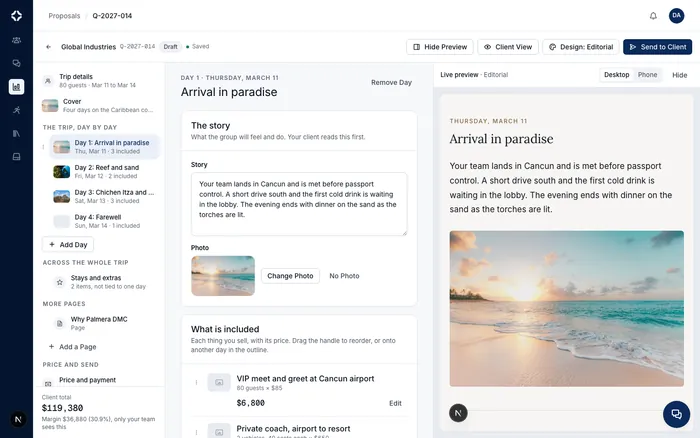
Proposals now open in a new builder that follows the trip the way your client reads it: one day at a time, with the story of that day, a photo, and what is included, next to a live preview of your chosen design.

  • Set the group once (adults, children, free places, rooms) and quantities follow it: “80 guests × $85” updates by itself when the group changes.
  • Drag items between days and days into a new order; dates follow, and Undo is always one click away.
  • Answer a few questions to start a proposal from scratch, then fine-tune it.
  • Send to Client from the builder, with the link, the message and how they say yes in one place.
  • If two people edit the same proposal, you see who else is in it, and DMC Pilot asks before one person’s save replaces another’s.
  • Every client design, and the PDF, now group what is included under each day.
  • The builder adapts to smaller screens; on the phone, proposals are read and share only.
The proposal builder showing Day 1, Arrival in paradise, with the story the client reads, a beach photo, what is included and a live preview of the client's design
Screenshot of the product with a fictional demo company.

Price breakdowns on proposal items

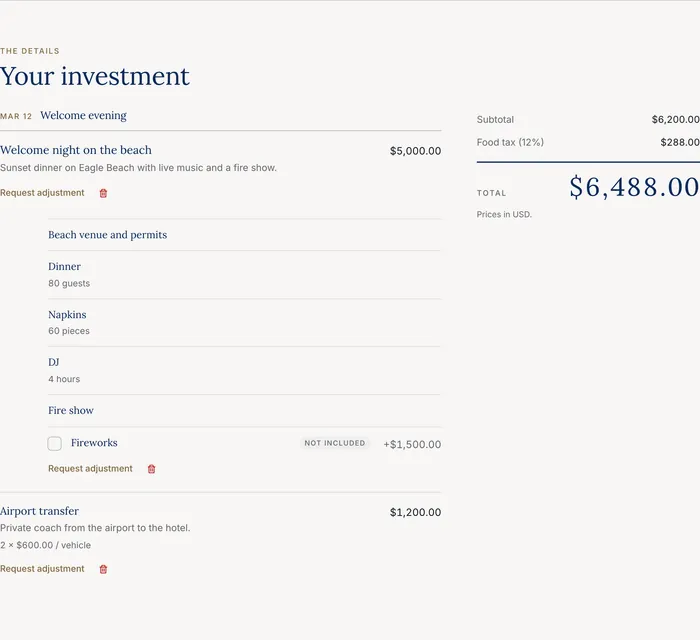
Any item on a proposal can now open into a breakdown. “Welcome night on the beach” shows one total, and the lines underneath explain it: the venue, dinner for 80 guests, 60 napkins, a DJ for 4 hours. The item total is always the sum of its lines.

  • Choose per item what the client sees: every line with its price, the lines with one total price, or only the total. Your costs and margins never reach the client, and hidden line prices stay hidden.
  • Lines can be optional extras the client ticks on the proposal, like fireworks for +$1,500, and the total updates.
  • Packages from Products & Services arrive as one item with their lines, and templates keep their breakdowns.
  • Invoices and the invoice PDF follow the same view. QuickBooks and Xero receive one line per item by default, or one per breakdown line if you prefer (Settings, Accounting).
  • After the client accepts, lines with a supplier become services for your operations team, grouped under the item.
A client proposal showing Welcome night on the beach at one price, with the venue, dinner for 80 guests, napkins, DJ and fire show listed underneath, and fireworks as an optional extra
Screenshot of the product with a fictional demo company.

Export all your company data

The company Owner can now download your company’s records and files in one archive, from Settings, Data & Privacy. It is a copy to keep, on every plan.

  • Request it and we prepare it in the background. You get an email when it is ready.
  • Download it after signing in. It stays available for seven days, and you can request a new one at any time.
  • It includes private conversations, My Files and unsent chat drafts. Passwords and access keys are never included. It is a copy to keep, not a restore point.

Notification emails make the next step clear

Notification emails now tell you what happened, where it happened, who changed it, and when. Clear buttons take you straight to the proposal, program, or conversation.

Grouped updates are easier to scan, with a plain-text version for email readers that need it.

Keep up with your group conversations

Messages in your group chats now send a phone notification by default. Mute a conversation whenever you need quiet.

Busy conversations group their notifications, and a mention sends one alert. Messages you send yourself, Dispatch replies, and system posts stay quiet.

Price lists bring in vehicles and seats

Supplier price-list imports now pick up vehicle types, stated seat counts, minimum hours, and how each rate is charged. The review shows when a seat count comes from a price band and asks you to confirm what the file leaves out.

Set missing seats for several rows at once before publishing them to Products & Services.

Price lists retry unreadable answers sooner

When an AI reader returns an unreadable answer, price-list imports can try the next reader immediately. Parts of the file already read remain saved, and the results still need your review before anything is published.

Choose how your proposal shows prices

Show prices for each item, each day, or just the trip total. Add a trip title and separate adult and child prices, then see the result as you work.

Build reusable templates in the same day-by-day builder. Products added from Products & Services bring their current supplier costs when you apply the template, while costs stay private to people with Money access.

Choose who can issue refunds

You can now choose who may issue refunds and credit notes with a separate role permission. Existing refund access is carried forward.

  • Service and option prices follow the Money permission throughout the app and connected integrations.
  • Program services and delivered headcounts are visible again, including in Dispatch and incident links.
  • Managers can open Fleet. Saving a Dispatch memory for the whole team is reserved for administrators.

Roles and permissions cover every new feature

Every feature added in recent weeks now follows your roles exactly, on the web and on the phone. Deal statuses, supplier imports, arrivals and stays, Products & Services, supplier bills, After-Event Reports and team chat all check the same permissions you set for each role.

  • Changing a price or a supplier cost now always needs the Money permission, wherever it happens.
  • Notes you add when you move a deal to a new status are now saved with that move.
  • The role editor explains each permission in plain words, so it is easier to build a custom role.
  • The preset roles keep exactly the access they had. Custom roles that held one half of a pair (for example, editing services without Money) now need both.

Import supplier price lists, hundreds at a time

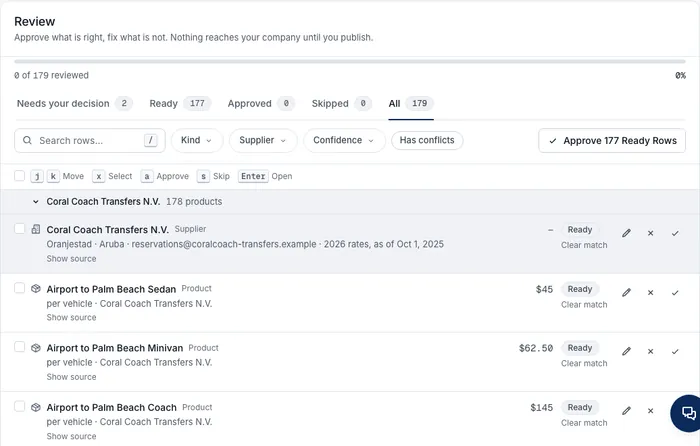
Upload a supplier’s price list and DMC Pilot proposes the supplier itself, with the details it finds in the document, such as contact people, email, phone, address, tax number, payment terms and how long the prices are valid. Every price is linked to that supplier, and if you already have them, it suggests the match instead of creating a duplicate. Bank details are never copied in.

  • Review hundreds or thousands of rows with ease: tabs for what needs your decision and what is ready, search and filters, select many rows at once, approve everything that is ready in one click, and undo until you publish.
  • Upload up to 500 documents or a whole folder in one go. They are read in the background, so you can leave and come back to review whenever it suits you. A supplier named in several documents appears once.
The import review screen: a supplier proposed from its price list with 178 products grouped under it, tabs for Needs your decision and Ready, and an Approve 177 Ready Rows button
Screenshot of the product with a fictional demo company.

Supplier replies, bills and rate cards read for you

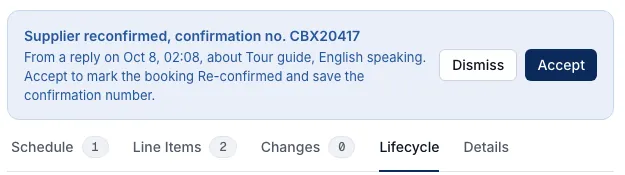
When a supplier answers a booking request, DMC Pilot reads the reply and suggests the next step, such as “Supplier reconfirmed, confirmation no. CBX20417”. Accept it in one click, or dismiss it; nothing changes until you do. If the supplier asks for a change instead, the booking is flagged for you.

  • Supplier bills are compared with what you booked, line by line, with a clear note when something differs (“Billed 3, booked 2”, “Not on the booking”). It is a flag for you to check and never holds up approval or payment.
  • When you read a supplier’s rate card from a document, each price is filed under the right item in Products & Services, with its unit and currency.
A supplier booking with the suggestion: Supplier reconfirmed, confirmation no. CBX20417, with Dismiss and Accept
Screenshot of the product with a fictional demo company.

Client icons from their own website

Each client now shows the icon from its own website wherever it appears: companies, prospects, deals, the deal board, the deal page and the client page, on the web and in the phone app. Add or change a client’s website and the icon follows.

  • When you add a company, Website fills in from the first business contact email. Personal addresses such as Gmail fill nothing, and you can always change or clear it.
  • Adding a contact to a company with no website offers the email’s domain as the company website, for you to tick if it is right.

Long price lists read in full

Price lists of many pages and hundreds of rows are now read step by step, so long PDFs finish reading. Tables with several price columns, such as one way and round trip, keep every price under one set of column names, and any row the reading misses is added for you to check. If a reading ever stops, Read File Again picks the import back up, keeping every decision you already made.

A phone Day sheet that shows what is happening now

The Day sheet now highlights what is happening right now and scrolls to it when you open it, and the highlight moves on as the day goes. Every row opens: flights, transfers and supplier bookings show their details, a contact card and only the actions that make sense, such as confirming a supplier booking. The IROPS page is easier to use, items that need your attention open the item itself, and client pages put the main contact and quick actions first.

Notifications during setup, and calmer forms on the phone

The phone asks whether to turn on notifications during first run, once, and lists only the alerts you can actually get. While notifications are off, the notification types show as off, and turning them back on brings your choices back.

  • Save and Done wait for a real change, and create buttons wait until the required fields are filled in, with a short line saying what is missing.
  • New company fills Website from the contact’s business email, and New person offers the email’s domain as the company website.
  • Buttons that only sent you to the web app are gone, such as New Deal on the client page.

Save waits for a real change

On edit forms, Save becomes active only once something actually differs, and rests again if you change a field back. On new items, the main button waits until the required fields are filled in. A short tooltip says why a button is resting, so you never wonder whether a save went through.

Removed team members leave their program teams

When someone leaves your company, they now come off every program team and roster automatically, so a team never shows a name you can’t reach. Past timesheets and reports keep their real name, so the record of who worked when stays complete.

Six proposal designs to choose from

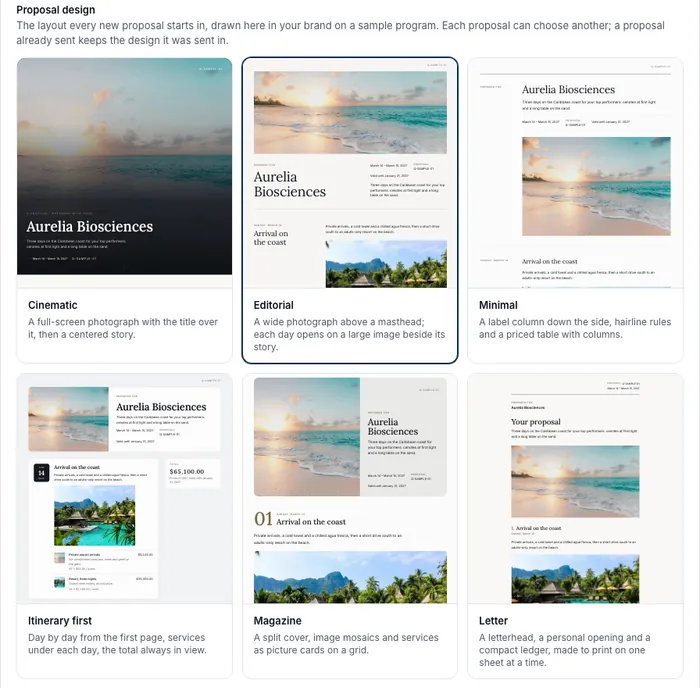
Pick the layout your proposals open in: Cinematic, Editorial, Minimal, Itinerary first, Magazine or Letter. The Branding page shows each one drawn in your own colors, fonts and logo before you choose, and any single proposal can use a different design.

  • Editorial is the new default for companies that have not picked one. Proposals you already sent keep the design they were sent in.
  • Heading and body fonts now come with a weight setting, and more font pairings are available.
  • A proposal link pasted into an email or a chat now shows its cover image.
The Branding page in Settings showing six proposal designs, Cinematic, Editorial, Minimal, Itinerary first, Magazine and Letter, each drawn on a sample program.
Screenshot of the product with a fictional demo company.

Products & Services, one catalog for everything you sell

Service Templates and the products in the Resource Library are now one catalog, Products & Services. Each item shows its client price, who delivers it, what it costs you and the margin, and a supplier cost can be marked “to confirm” until you have it. Each supplier’s page lists what they supply.

The menu is reorganized around one job per section: Sales for winning business, Operations for who delivers it (with Suppliers, supplier bills and the supplier inbox together), a new Library space, and Settings for configuration. The product now says Suppliers everywhere, and old links keep working.

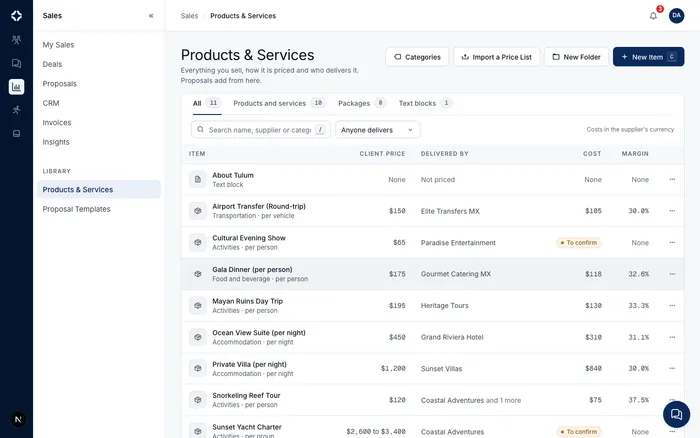
The Products & Services list with each item's client price, the supplier who delivers it, the cost and the margin.
Screenshot of the product with a fictional demo company.

Draft a proposal from the client's documents

Upload a brief, an RFP or a call transcript (PDF, Word, text or subtitle files) and DMC Pilot drafts the proposal for you, using your own catalog, past proposals and proposal templates. Lines that need a second look are flagged so the read-through goes quickly. Start it from New Proposal.

Your own deal statuses

Name your deal statuses the way your team talks, for example Tentative, Definite or Postponed, give each a color and an order, and choose what each one means: open, won, lost, paused or canceled. The pipeline, board, reports and insights all follow your statuses. New deals start in one of your open statuses; pausing, losing or canceling a deal asks the right questions.

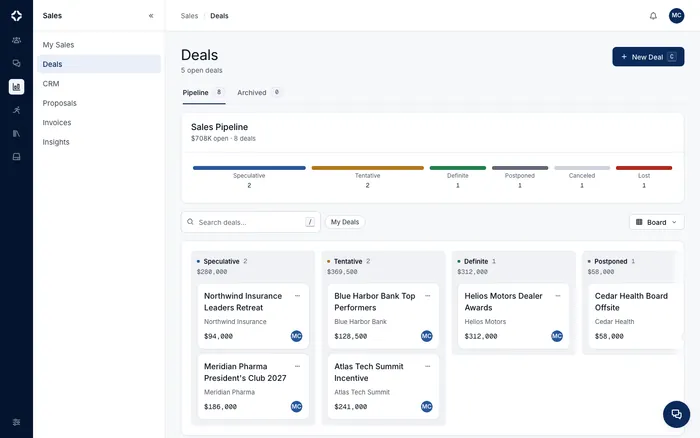
The Deals board grouped by company-defined statuses such as Speculative, Tentative, Definite and Postponed.
Screenshot of the product with a fictional demo company.

Arrivals and stays

Programs can now follow guests from the right terminal to the right hotel, night by night.

  • Flights record the terminal at each end, and arrival transfers are grouped by terminal, so guests landing at different terminals never wait for the same coach.
  • Meeting points name the exact spot on each pickup, with instructions for the guests.
  • Guests can have more than one hotel stay. Change a guest’s hotel mid-program and transfers drop off and collect at the right hotel.
  • A new Rooming page under Attendees: rooms with type and number, who shares with whom, capacity night by night, and a rooming list you can download as CSV.

Chat that works the way you expect

  • The message box is one row, like the messaging apps you already use. It grows as you type, and the voice button turns into Send at the first letter.
  • Files you drop or paste into a conversation now attach to your message instead of sending straight away. Add a caption and send everything as one message.
  • An unsent message waits for you when you come back, even in another browser.
  • “Is typing” is now a company setting, on by default.
  • Voice notes play on a single line.

Arrivals, stays and the new chat on the phone

The phone shows the terminal and meeting point on each run and each guest’s hotel stays. Chat gets the one-row message box, drafts that follow you between phone and computer, and messages with several files.

Products & Services shows only the company you are working in

People who belong to more than one company no longer see another company’s items, destinations or suppliers in Products & Services or its pickers.

Whole amounts in yen and other currencies without cents

Proposals and invoices in currencies such as the Japanese yen or the Korean won now show and total in whole units, so every amount is one a client can actually pay.

Who Attends, for every event in a program

Say which guests attend which events with simple rules: everyone, whole groups, or chosen guests, with named exceptions. Build a list by searching, pasting names or using a spreadsheet column, and review who is added, removed or waitlisted before you save. Dietary by Event and capacity counts now use the real guest list for each event, even on programs with thousands of guests.

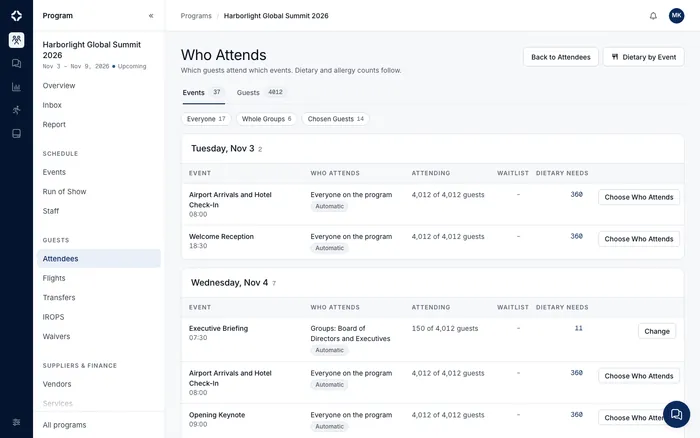
The Who Attends page listing a program's events by day, who attends each one, attendance out of 4,012 guests and dietary needs.
Screenshot of the product with a fictional demo company.

Refunds and credit note reversals

Refund all or part of a client payment, with the date, method, reference and reason, and never more than was received. An issued credit note can be reversed with its own numbered record. Nothing already issued is edited, and the client always sees an accurate balance.

Suggested summary for the After-Event Report

When you write a report’s debrief, you can ask Dispatch AI for a suggested summary, what went well, what to improve and recommendations. Each suggestion cites the program facts it comes from and sits beside the debrief. Nothing reaches the report until someone on your team adds it and saves.

Proposals in Spanish

New proposals can be written for the client in Spanish. The proposal page, the PDF, the contract and the email the client receives all appear in Spanish, and each sent proposal keeps the language it was sent in.

Clearer guest actions and check-in on the phone

Each guest on the phone shows only the actions that fit their status, and the check-in console keeps only the check-ins that will be accepted when it reconnects.

More control over supplier bills

Finance can void a supplier bill that has not been paid. A supplier is emailed, in your company’s branding, when a bill is sent back to them. Payments on a closed supplier account wait until the account is reopened.

Team emails in your company's branding

Notification digests, team invitations, proposal change notices, CRM reminders and supplier replies now arrive with your company’s name, logo and color.

Bring in up to 20,000 records at once

Data imports now take spreadsheets of up to 20,000 records, as well as PDFs, in one guided flow. Columns are matched for you, anything unclear waits for your review, and nothing is saved until you confirm. A large import can be paused and resumed, and prices you did not provide stay marked as unpriced rather than zero.

RFP drafts find the right services in your catalog

When drafting a response to an RFP, DMC Pilot now finds catalog services that match what the client asked for even when the wording is different, and uses your real catalog prices, suppliers and units.

Export proposals to Excel or CSV

Download a proposal as a spreadsheet: a client copy, an internal copy with costs, or a content-only copy for colleagues without financial access. The file matches the proposal exactly, including the version the client accepted.

Booking requests and reconfirmations for suppliers

Send a supplier a booking request from the program, or let DMC Pilot send one automatically when a supplier is added. A booking shows as requested only once the email is delivered. Reconfirmation is due a set number of days before the supplier’s first service date, with a company default you can change per booking.

Client change requests arrive right away

When a client asks for a change on a proposal, the proposal’s creator, the deal owner and whoever is handling the feedback get an email immediately instead of waiting for the hourly digest. Each person can switch these off in their profile.

Faster pricing in the proposal builder

Price services straight from the keyboard and set a margin per line. A service with no price yet is clearly marked as unpriced rather than shown as zero, and a proposal cannot be sent while a visible service is still unpriced.

The After-Event Report

Close every program with a report built from what actually happened: attendance, flights and delays, transfers with their real times, services delivered and issues handled, plus your team’s own debrief. Write a separate client version, preview it, then share it through the client’s link or a report-only link with a password and expiry. Both versions download as a PDF in your company’s branding.

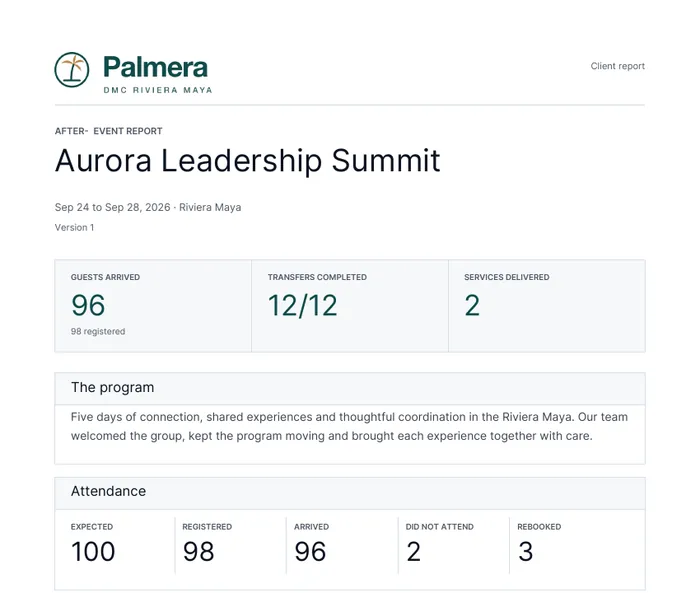
The first page of a client After-Event Report PDF for a fictional program, with guests arrived, transfers completed and attendance figures.
Screenshot of the product with a fictional demo company.

Issues and changes, logged as they happen

IROPS is now a list of everything that went off plan or changed: log an issue or a change note with photos, the people and runs it affects, an owner, notes, costs and how it was resolved. You decide what the client sees. Flights keep a history of every status change, and transfers record when they actually left and finished, next to the planned time.

Log an issue from the phone, even offline

Log an issue or a change note from the phone, with photos, even without signal; it sends when the signal returns. Issues have their own list and detail screens, you can mark a run complete, and the field you are typing in always stays visible above the keyboard.

Only the actions that make sense

Runs, bookings, bills, proposals, invoices, guests and more now offer only the actions that fit where they stand. A completed run can no longer be canceled, for example, and if something has changed in the meantime you get a short explanation.

Your logo, larger everywhere clients and suppliers see it

Your logo now appears larger on proposals, PDFs, invoices, emails, the client view, the supplier portal and link previews. New uploads also trim empty space around the logo so it fills its place.

Suppliers can send their bills through the portal

Suppliers can now send a bill, or a corrected one, from the supplier portal. It lands in your bill review with the person who sent it, and anything that does not match is flagged. You can also share program files with a supplier one by one.

A live client view of the whole program

Share one link that shows your client the program as it happens, in your branding: arrivals, the day’s schedule, transfers on the road, what is waiting on them, payments, documents and photos, refreshed every few seconds. You decide what each link shows with 23 switches and presets, and you can preview it as the client before saving. Money, guest names and personal details stay off unless you turn them on.

Built for programs of thousands of guests

  • Programs with up to 4,000 guests load quickly, and transfer planning seats everyone.
  • Check-in links with QR codes for meet and greet, boarding, departures and activities, plus an iPad check-in console that keeps working without signal and a live boarding board in the office.
  • Vehicle rules per guest group: vehicle type, one party per vehicle, priority and fast track, luggage by truck and greeter notes.
  • Flights show the best known time, with estimates and delay badges, and you can enter an ETA for a charter.
  • Dietary needs counted per event, ops alerts and activity manifests.

Confidentiality agreement before a proposal opens

Ask clients to accept a confidentiality statement before they can open a proposal, as a company standard or for a single proposal. Each acceptance is kept with the exact wording, the person’s details and the time, on the proposal’s activity.

Check-in, ops alerts and broadcasts on the phone

The phone app now handles check-in lists that keep working without signal and send when the signal returns, boarding by run, Dietary by Event, team broadcasts, ops alerts and flight ETAs.

Sales teams, targets and My Sales

Set yearly targets for the company, each sales team and each person. My Sales shows your own year against target, with pace and a projection, and suggests your next moves from your open deals and proposals. A proposal can now carry up to five commissions, each with its own agency and terms, and a commission can use one rate on services and another on fees.

A rebuilt supplier portal

Invite supplier contacts straight from the supplier’s page. Suppliers sign in to a portal in your branding that shows what needs their action first, the next seven days of jobs, run sheets, manifests, change requests and their bills. You choose, per supplier or as a company default, whether they see amounts, guest names, flight numbers, bills and documents. One supplier can work with several DMCs from the same sign-in.

A Finance role, ready to use

A new Finance role covers costs, bookings, payment schedules, supplier bills, client invoices and payments on every program, and can read programs, clients, deals and proposals, without access to guests, team or settings.

A clearer Sales Insights page

Sales Insights now opens with your key figures and their trend, won and forecast business month by month against target, team progress, and proposal insights, followed by the funnel, win rates, time in each stage and deals closing in the next 30 days. People without financial access see counts and percentages, never amounts.

Supplier bills from review to paid

Send a supplier bill back with a reason, and the corrected bill links to the one it replaces. Finance is told when a bill is approved and has its own queue: awaiting payment, in review, sent back and paid. Record partial or full payments, and see what is paid and outstanding to suppliers on each program.

More reliable Dispatch AI and proposal pricing

  • Dispatch AI now finds guests by name reliably on every program.
  • Catalog services added to a proposal keep their price, unit and supplier.
  • Double-booking warnings now reach everyone who works with suppliers.
  • Tightened access checks across the product.

Roles and permissions, rebuilt

Choose from ready-made roles or build your own, area by area, with a switch for each action and a preview of what the role can see. Freelancers are free: they see only the programs they are assigned to and never take a paid seat.

A log of every change

Every change records who made it, from where (web, phone, client portal, supplier portal or a shared link) and what changed. The Logs page reads as a timeline you can filter and export, and programs, proposals, clients and suppliers each have a History tab.

Getting Started for new companies

A new company’s Home opens with a Getting Started checklist: company details, team, roles, destinations, your data, a first proposal and the phone app. Every step can be skipped and reopened.

One place to pick photos, videos and files

Add media anywhere (chat, proposals, services, suppliers, destinations and program files) from one picker: upload, Storage, this program or recent files. Photos are resized with their location data removed, videos are compressed before they upload, and every photo, video and PDF gets a thumbnail.

Turn an accepted proposal into a program

Create a program from an accepted proposal in one step: dates, destination, client, sold services, suppliers and itinerary come across. Or start a blank program and add the destination and client as you go.

Your brand on everything you share

Add your company icon and it appears in the sidebar, the phone app and the browser tab. Every page you share with clients and guests carries your name and preview image, and client and supplier emails, the supplier portal and PDFs use your branding.

A faster, fuller team chat

Messages open instantly. Reply to a message, forward it, see read ticks and who has seen it, search a conversation, and browse its media, files and links. The conversation list is easier to scan, voice notes show a waveform, and Dispatch AI now lives inside chat.

Roles and freelancers on the phone

The phone app follows the new roles and permissions, freelancers sign in and see only the programs they are assigned to, and new users get a short welcome.

Storage for your company's files

Browse, preview and share your files in one place: team folders, program folders and My Files, with resumable uploads, thumbnails, stars, descriptions and a Deleted Files bin. Share with people or programs, or create a public link with an optional password.

Financial figures stay with the people who need them

Without financial access, costs, margins, invoices, prices and deal values are no longer shown anywhere: not on pages, in notifications, emails, exports, search or Dispatch AI answers.

A new look, and faster pages

DMC Pilot has a new, calmer navy design with a dark mode, and every page was checked from a large desktop down to a phone. Pages load faster, and big lists are paged on the server with 10, 25, 50 or 100 rows, remembered per table.

The new look, Storage and chat on the phone

The phone app has the new navy design, a redesigned chat, and your company’s Storage in your pocket.