


RFP response software for DMCsStop retyping client briefs.
An RFP often arrives as a one-line email with 20 pages attached. RFP response reads it, whether it is a PDF, Word, Excel or even a scan. It matches what the client asks for to your own price list, and gives you a priced draft to review. Nothing is sent until you have checked it.
How do you respond to an RFP without retyping the brief?
Receive
The inquiry arrives: pasted, uploaded or forwarded, with its attachments, such as the brief, the guest list or last year's program.
Read
The budget, guest numbers, dates, destination and preferences are picked out. Each line in the draft quotes the request it came from.

Answer the brief while the client is still deciding.
A priced draft from your own catalog, for a person to finish.
Match
Requests are matched to your Products & Services by name, then by meaning. A “boutique, walkable” hotel can be found by what it is, not only by its name.
Draft
A priced draft proposal appears in your list. Prices come from your own price list, and anything without a match is flagged.
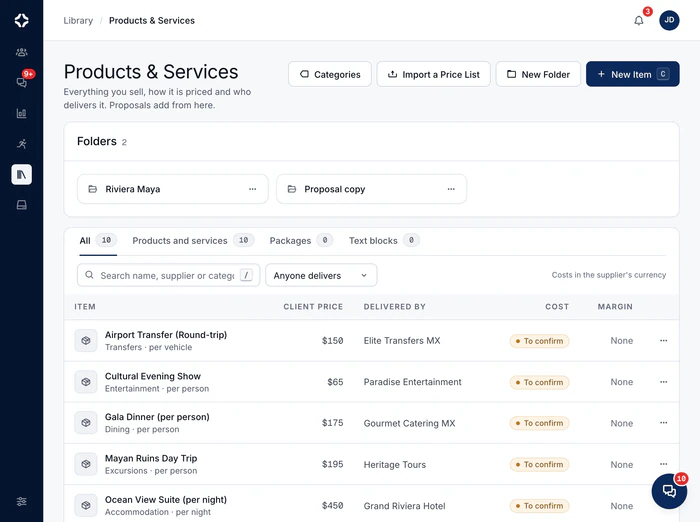
Where do the prices in the draft come from?
General AI tools will happily make up a rate. RFP response cannot: prices come only from your own Products & Services. This rule is built into DMC Pilot itself, not left to the AI. That is why the draft is a starting point you can trust, not a guess you have to price again.
The draft opens in the same DMC proposal software your team already uses, and the deal it belongs to sits in the DMC sales pipeline and CRM.
- Reads PDF (scans included), Word, Excel and images; CSV and email files when forwarded to a program inbox
- Each line quotes the request it came from, and says when it was matched by meaning
- Requests without a price are flagged, never filled in
- Draft a proposal from a brief, an RFP or a call transcript, started from New Proposal
- The draft opens in your usual proposal list: same review, same steps
- Included on Scale and Enterprise
RFP response questions
What file types can it read?
The formats briefs really arrive in: PDF (scanned pages too), Word, Excel and images, uploaded or forwarded. CSV and email files are read when they are forwarded to a program's inbox, and anything else can be pasted as text. An old .doc file needs saving again as .docx or PDF. A one-line email with a 22-page attachment is exactly what it is built for.
How does it match the client's requests to what we sell?
By name first, then by meaning where the names differ. Clear name matches are used as they are. For the rest, “somewhere walkable, boutique, good wine” can find the right hotel and the right dinner in your Products & Services, even when none of those words are in the item names. Each line in the draft quotes the request it came from, so you can judge it.
Where do the prices come from?
From your own Products & Services, and nowhere else, with your real prices, suppliers and units. The AI chooses and describes. It never sets a price. If nothing priced in your list matches a request, it still becomes a line, left without a price and flagged for you, rather than given a made-up one.
Can it draft from a call transcript or a client's documents?
Yes, on Scale and Enterprise. Start from New Proposal and upload a brief, an RFP or a call transcript (PDF, Word, text or subtitle files, or pasted notes). DMC Pilot drafts the proposal from your own price list, past proposals and proposal templates. It flags the lines that need a second look, so checking goes quickly. Audio and video files are not read.
Does anything get sent automatically?
No. You get a draft proposal in your list. Each line quotes the request it came from, and the destination, dates, guest numbers and budget from the brief are in its internal notes. You edit, adjust and decide. RFP response removes the retyping, not your judgment.
The morning a brief arrives
Upload a long RFP and get a priced draft to review.
RFP response reads the brief and matches what the client asks for to your own price list. Nothing is sent until you have checked it.

Deals & pipeline
Name deal stages the way your team talks, and see them as a board or a list.
MoreProposals
Build proposals from your own price list, in six designs. See your margin as you go, and let the client sign online.
MoreProducts & Services
One price list for everything you sell: the client price, the supplier, your cost and your margin.
More
See DMC Pilot in a 30-minute demo.
A 30-minute call with our team, using data like yours. If it fits, we set up your price list, suppliers and first programs with you.