


AI inbox software for event change requestsForward the email. Approve the changes.
Forward a supplier's new rate, a hotel's rooming list or an airline's schedule change to the program's own email address. The AI inbox labels it, checks who sent it and lists the changes it asks for. You approve or skip each one, and what you approve goes into the program.
How an email becomes a change in the program
Forward it
Each program has its own email address. Forward anything to it, and the attachments come too.
Label
It is labeled by kind, such as confirmation, change, cancellation, invoice or quote. It is marked Urgent or Needs Reply when it is, and the sender is checked against your contacts.
Read
It lists the changes the email asks for, to guests, flights, events and supplier rates. The original words sit beside each one, so checking takes a glance.

The whole team sees supplier emails and the changes they ask for.
The change lands on the program, where the whole team can see it.
Review
Tick the changes you agree with and apply them, or dismiss the email with a reason. Nothing changes until you say so.
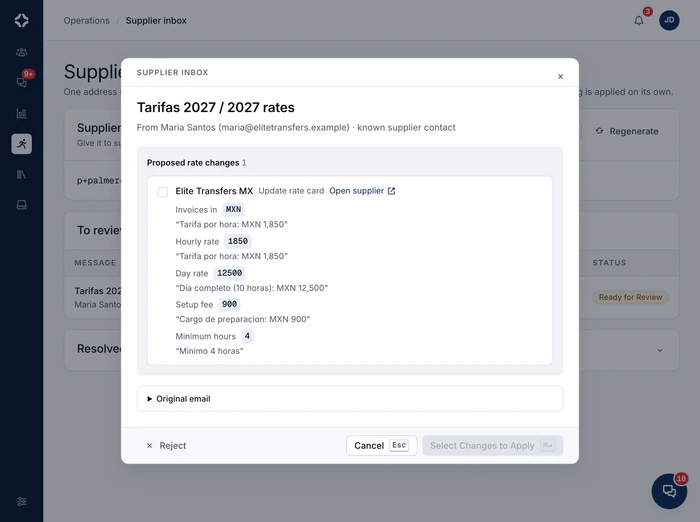
Each change is added to the right part of the program.
Many tools can read an email. The AI inbox is different because it knows your programs, suppliers and guest lists. A supplier's new rate does not become a note for someone to retype. It becomes a change request on the right supplier, with the effect on your cost and the client price filled in. You forward the email and confirm the result.
- Every sender checked against your known contacts
- Urgent, Emergency and Needs Reply badges in the list
- Empty attachments, like signature logos, are skipped
- Supplier changes show the effect on your cost and the client price
- Client inquiries can become draft proposals with RFP response
- A note in the program chat when an email arrives, with the number of changes it found
- Included on Scale and Enterprise
AI inbox questions
What kinds of email does it understand?
The everyday email a program receives. Each one gets a label: confirmation, change, cancellation, invoice, quote, question, marketing or unrelated. It is marked Urgent or Emergency when it is, and flagged when it needs a reply. Empty attachments, like the logo in a signature, are skipped. Then it lists the changes the email asks for, to guests, flights, events or supplier rates, with the original words beside each one.
How does it handle fake or harmful email?
Each sender is checked against your suppliers' contacts. A match is marked Known contact. Anyone else is marked Unverified sender and is not trusted by default. An email is treated as something to review, never as instructions to follow. Nothing changes until a person on your team approves it.
What happens after we review it?
You tick the changes you agree with. Each one shows the current value beside the new one, and Apply saves them. A supplier's new rate becomes a change request, with the effect on your cost and the client price already filled in. A client inquiry can become a draft proposal. Anything else can be dismissed with a reason. A few rarer kinds of email are kept for you to handle by hand, and the inbox tells you when that is the case.
Why does each program have its own address?
Because the program is what makes an email make sense. Email sent to the Lisbon program's address is read against that program's suppliers, services and guest list. That is how each change lands in the right place. Your company also has one supplier inbox address of its own, under Operations.
At her desk
The AI reads the supplier's email and lists the changes.
Forward it to the program's own address. The AI inbox lists the changes it asks for, and you approve or skip each one.


See DMC Pilot in a 30-minute demo.
A 30-minute call with our team, using data like yours. If it fits, we set up your price list, suppliers and first programs with you.