


TripCreator alternative for DMCsBuilt only for MICE and incentive DMCs, from the proposal to departure.
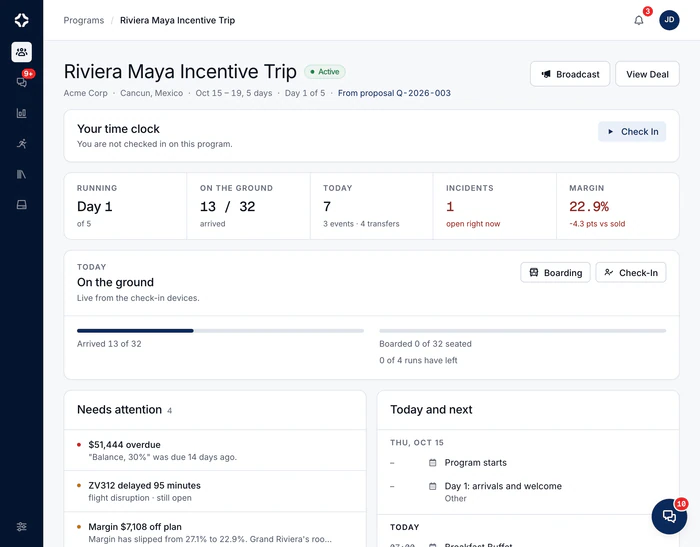
DMC Pilot is built around one corporate program at a time: the air manifest, transfers, day sheets, your team on site and the margin on that program.
TripCreator serves DMCs, tour operators, agencies and DMOs from one configurable platform, with a booking engine and a traveler app. It has a DMC and MICE offer too.
DMC Pilot does less travel selling and more MICE operations. Here is what that gives a DMC running corporate programs.
Why DMCs choose DMC Pilot
Transfers that follow the flights
The air manifest itself becomes transfer runs. When a flight moves, a run not yet approved is re-timed, and an approved one is flagged for your team.
A real phone app for your team
TripCreator gives field crews a live web view with no login. DMC Pilot gives staff and freelancers an iPhone and Android app with team chat, the day sheet, and check-in lists for arrivals, transfers and departures that work without signal.
Your margin against what you sold
When the client accepts, the sold costing is saved. Live cost is watched against it through the program, with each supplier's share.
Suppliers in a portal in your name
Suppliers confirm, reconfirm, answer changes and send bills in their own portal. Each bill is checked against what was booked.
A live page for your corporate client
Your client follows arrivals, today's schedule and transfers on a live page in your brand. Your costs and margin never show.
Airport transfers, day sheets, margin alerts and Client View are on Growth and up. The features page shows the plan for each feature.
TripCreator and DMC Pilot, side by side
From each website as of October 2026. “Not stated on their website” means we could not find it there, not that the product cannot do it. Ask the vendor.
| What you need | TripCreator | DMC Pilot |
|---|---|---|
| Proposals with costing and margin | Yes. Live pricing and margin, group brackets | Yes. Proposals with live costing, margin and e-signature, in six designs |
| Live flight tracking | Yes, through Cirium | Yes. The air manifest, tracked live |
| Transfers re-timed from flight changes | Not stated on their website; vehicles and drivers are scheduled | Yes, on Growth and up. The manifest becomes transfer runs that follow flight changes |
| Run of show for the team | Yes. A live pocket view for field crews, no login | Yes, on Growth and up. Day sheets that build themselves from the program |
| App for your team on site | A live web view rather than an app | Yes. iPhone and Android app for your team, with chat and check-in lists that work without signal |
| Supplier requests | Yes. Suppliers reply on a dedicated page | Yes. Suppliers confirm, reconfirm and answer changes in their own portal |
| Online booking and payments | Yes. Booking engine, Stripe, PayPal and others | No. Your team records payments as they arrive |
| Allotments and net rates | Yes. Contracted inventory, allotments, agent net rates | No. No net-rate contracting, allotments or release dates |
| Free trial | Yes. 14 days | No. Onboarding is guided and paid |
Switching is simple
TripCreator says contacts can be exported as CSV. Ask for your contacts, suppliers and products in spreadsheet form.
Here is what you can bring across:
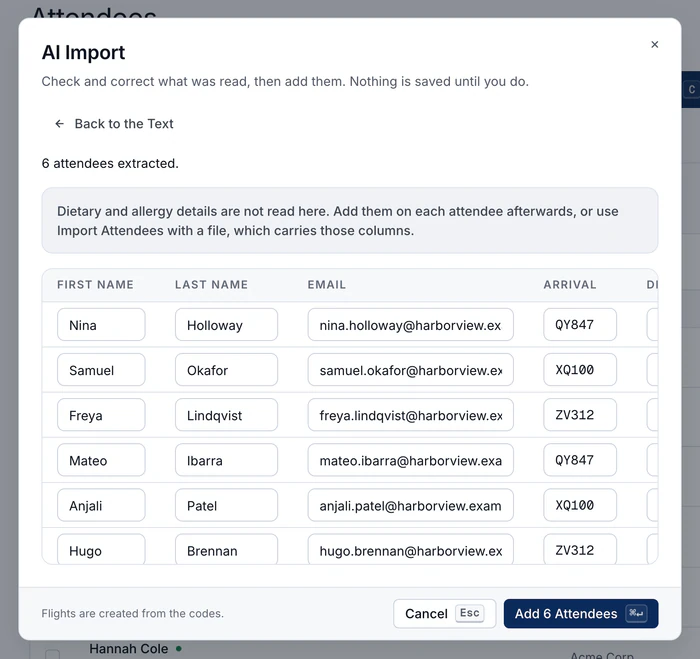
- Guest and rooming lists from CSV or Excel, on every plan. The columns are matched for you, so a list from another system needs no reformatting.
- Clients, suppliers and your price list through Data imports on Growth and up: CSV, Excel or PDF files, up to 20,000 new records at a time.
- Supplier price lists create the supplier with every price linked to it. You can upload up to 500 documents or a whole folder at once.
- Nothing is saved until you review it. Possible duplicates are flagged, and you confirm the import yourself.
Onboarding is hands-on and paid. We load your price list, suppliers and first programs with you. It usually takes two weeks:
- Week one. We go through the setup checklist with you: company profile and logo, your team and their roles, destinations, then your price list and supplier rates imported.
- Week two. Your suppliers are loaded and invited to their portal. We build two live programs together.
- From then on. Your team runs the programs, and we stay close through your first day on site.
Past programs are usually not worth moving. Keep them where they are, and start your next program in DMC Pilot.
What DMC Pilot costs
Our prices are published. There are three plans with a published price, month to month:
- Core, $999 a month. For smaller DMCs running 20 to 60 programs a year.
- Growth, $1,499 a month. For growing DMCs running 60 to 150 programs a year, with every operations tool.
- Scale, $2,499 a month. For established DMCs running 150 to 350 programs a year, with a full operations team.
You save 20% on an annual commitment. Large and multi-office operators get an Enterprise plan, priced with you. There is no free trial. All the details are on the pricing page.
TripCreator publishes its prices on its website, per user per month, with a 14-day free trial (checked October 2026).
Questions about TripCreator and DMC Pilot
Does TripCreator work for MICE?
Yes. TripCreator has a DMC and MICE offer with RFP import, rooming lists, run of show and a live view for field crews, and it tracks flights through Cirium. It also covers leisure and online booking, which DMC Pilot does not.
Does DMC Pilot have a booking engine like TripCreator?
No. DMC Pilot has no booking engine, no online payments from travelers and no agent portal. It is built for running corporate programs, not for selling travel online.
Is there a free trial?
Not with DMC Pilot. Onboarding is hands-on and paid, so you see the product with your own catalog, suppliers and programs. TripCreator's pricing lists a 14-day free trial, offered after a demo.
The bottom line for DMCs
TripCreator is a broad platform that serves many kinds of travel business well, especially those that sell and book online.
For a DMC running corporate programs, DMC Pilot is the more focused choice. It is built around the MICE program from proposal to departure. Transfers follow the flights, and your team has day sheets and a phone app. Suppliers work in their own portal, and the client has a live page. You see the margin on every program, and Dispatch AI, the assistant built into DMC Pilot, answers from your own records.
Checked October 2026: where these facts come from
Everything on this page about TripCreator comes from its official website, read on 8 October 2026. We did not use review sites or third-party lists. Products change, so check tripcreator.com before you decide. For more tools side by side, see DMC software compared.
- tripcreator.com
- tripcreator.com/solutions/dmc-mice
- tripcreator.com/solutions/group-travel-sic-series
- tripcreator.com/features/itinerary-builder
- tripcreator.com/features/booking-engine
- tripcreator.com/features/payments
- tripcreator.com/features/operations
- tripcreator.com/features/agent-portal
- tripcreator.com/features/integrations
- tripcreator.com/mobile-app
- tripcreator.com/integrations/white-label-mobile-app
- tripcreator.com/faq
- tripcreator.com/pricing
- tripcreator.com/legal/terms
Is something here wrong? If you work at TripCreator and a fact on this page is out of date, tell us through the contact page and we will correct it.
On the call
Book a demo for your team.
Operations and finance use different parts of DMC Pilot. A 30-minute call shows both, on a sample program like the ones you run.

Read next

See DMC Pilot in a 30-minute demo.
On a 30-minute call we walk through a program like the ones you run, and tell you plainly if it is a fit.